Since 13 May 2026, GA4 groups visits from AI assistants in a default channel called AI Assistant. To see them, open Reports, then Acquisition, then Traffic acquisition, and look for the AI Assistant row. Add Session source / medium as a secondary dimension to split it by platform: chatgpt.com, perplexity.ai, claude.ai, gemini.google.com and the others.
That is the quick answer. The longer one matters more, because the channel counts only part of what AI does for a brand. Visits from Google AI Mode are not in it, visits without a referrer end up in Direct, and the people who read your name in an answer without clicking are not in GA4 at all. This guide shows where to find AI traffic, how to build a report you can share, and how to read the numbers without overestimating or underestimating them.
What the AI Assistant channel counts
Google's definition is short. When the referrer of a visit matches its list of AI assistants, GA4 sets the medium to ai-assistant and the campaign to (ai-assistant), and the visit lands in the AI Assistant channel. Google does not publish the full list. Its help pages name ChatGPT, Gemini, DeepSeek, Copilot, Grok and Claude as examples.
To see what the list covers in practice, we looked at a high-traffic GA4 property in October 2026. These were the sources in its AI Assistant channel:
| Session source / medium | Platform |
|---|---|
| chatgpt.com / ai-assistant | ChatGPT |
| gemini.google.com / ai-assistant | Gemini on the web |
| gemini / ai-assistant | Gemini, recorded without a domain |
| perplexity.ai / ai-assistant | Perplexity |
| copilot.com / ai-assistant | Microsoft Copilot |
| copilot.microsoft.com / ai-assistant | Microsoft Copilot |
| claude.ai / ai-assistant | Claude |
Perplexity is there even though Google does not name it, and so is Claude. Every source carries the same medium, ai-assistant, which is a change worth noting: before May 2026 the same visits appeared as referral, or as (not set) when the link carried only a utm_source parameter, as many ChatGPT links do. If you compare periods across that date, the AI Assistant channel will seem to appear from nothing while Referral shrinks.
How to see AI traffic in GA4, step by step
Step 1. Open the Traffic acquisition report
In Reports, open Acquisition, then Traffic acquisition. The table groups sessions by default channel group. Find the AI Assistant row: it shows sessions, engaged sessions, engagement rate, key events and revenue for AI visits as a whole.
Step 2. Split it by platform
Click the plus sign next to the dimension name and add Session source / medium. Each AI Assistant row now shows which platform sent the visit. To keep only AI traffic in the table, add a filter on Session default channel group exactly matching AI Assistant.
Step 3. See which pages AI sends people to
Open Engagement, then Landing page, and add the same filter. The pages that receive AI visits are usually the pages AI platforms cite, which makes this report a useful cross-check with the sources you find in the answers. Our page on AI citation tracking explains how to collect those sources.
Step 4. Check what AI visitors do
In the same reports, look at engagement rate and key events for AI Assistant next to Organic Search. AI visitors often arrive after reading a recommendation, so they can convert better than their numbers suggest. Small samples swing a lot, though: compare months, not days.
Step 5. Go deeper with an exploration
For anything the standard reports cannot do, open Explore and create a free-form exploration. Use Session default channel group as a filter, Landing page and Session source as rows, and sessions, key events and engagement rate as values. You can save it and share it with your team.
What GA4 does not count as AI traffic
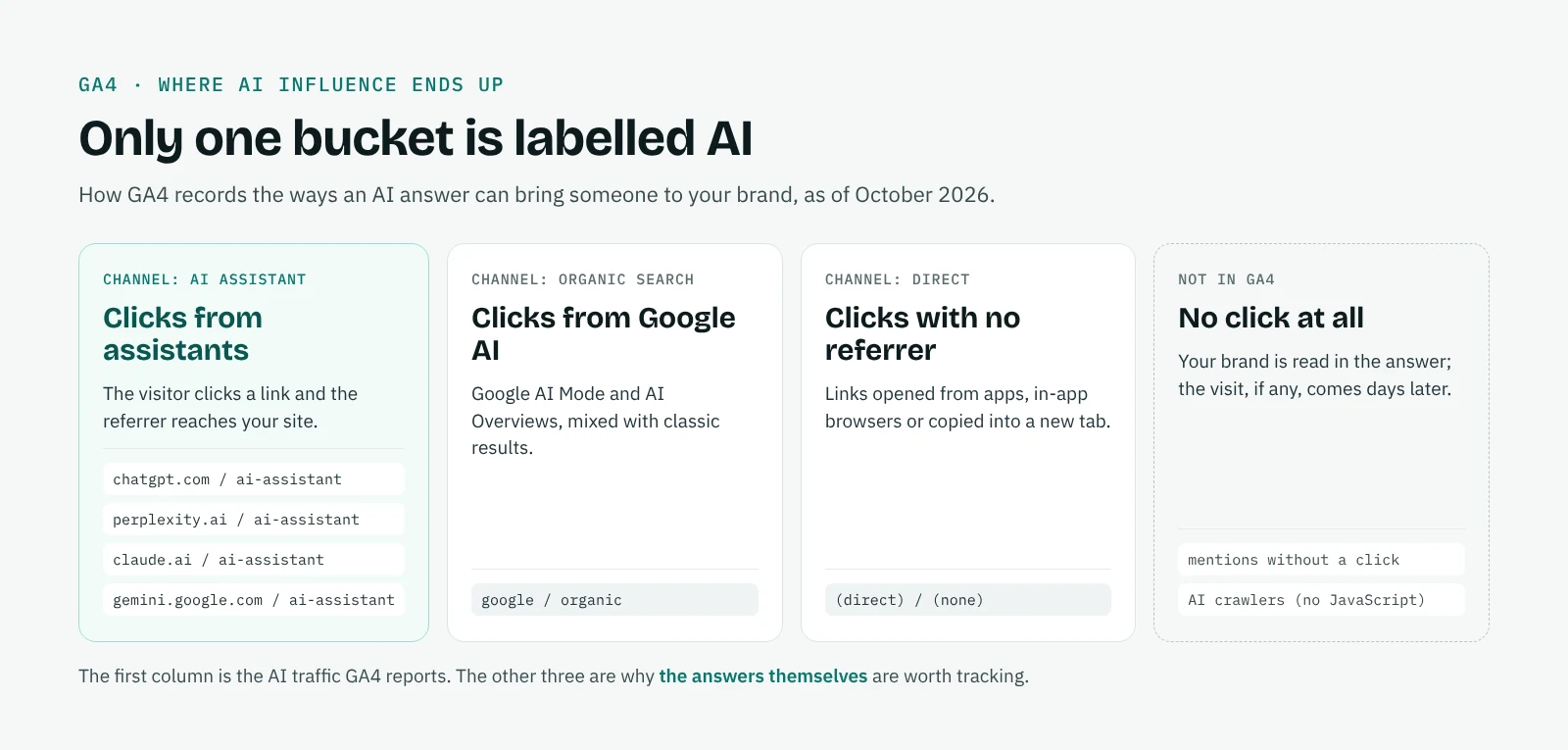
The AI Assistant channel measures clicks with a recognizable referrer. Four kinds of AI influence fall outside it.
Google AI Mode and AI Overviews. Google says explicitly that the AI Assistant channel excludes them. Their clicks are counted in Organic Search, mixed with classic results, and GA4 offers no dimension to separate them. Search Console has the same limit: its Generative AI report shows impressions only, for AI Overviews and AI Mode together. Our guide covers the Generative AI report in Search Console in detail. Our Google AI Mode tracker page compares what each tool can and cannot tell you.
Visits without a referrer. When an assistant opens a link in an app or an in-app browser, or a user copies a link into a new tab, the referrer is often lost and the visit is counted as Direct. Part of your Direct traffic is AI traffic that GA4 cannot recognize.
Mentions without a click. Someone reads your brand in an answer, closes the chat and searches for you on Google two days later. GA4 records an organic or direct visit and never connects it to AI. For many brands this is the largest share of AI influence. Two signals help: the trend of branded search in Search Console, and what customers say when you ask how did you hear about us.
AI crawlers. GPTBot, OAI-SearchBot, PerplexityBot and similar bots do not run JavaScript, so GA4 never sees them. If you want to know how often AI platforms read your pages, look at your server logs.
How to include data from before May 2026
Google has not said whether visits before 13 May 2026 were reclassified, and in many properties the channel starts on that date. If you need a trend over a longer period, or want to add platforms that are not in Google's list, create a custom channel group. Custom groups apply to reports retroactively.
In Admin, open Data display, then Channel groups, and click Create new channel group: GA4 starts from a copy of the default group. Add a channel called AI assistants with a condition on Session source that matches a regex such as:
.*(chatgpt|openai|perplexity|claude|anthropic|gemini|copilot|deepseek|grok|mistral).*Then move the channel above Referral and above Organic Search, because GA4 assigns each visit to the first channel it matches. A standard property can have two custom channel groups, with up to 50 channels each, and custom groups are not included in the BigQuery export. Review the regex every few months: new assistants appear and domains change.
How to build an AI traffic report
A report you can open every month needs four things: AI Assistant sessions and key events over time, the split by platform, the top landing pages, and a comparison with Organic Search. The quickest way to get them is to save the exploration from step 5 and add a line chart by week. If you report to a client, a Looker Studio page with the same filters keeps the numbers in one place, and our AI visibility report template shows where AI traffic fits next to the answers themselves.
Add one line of context to every AI traffic report: these numbers are the visible part. Without it, a client who sees 300 sessions a month from ChatGPT will think AI matters little, when the real question is how often ChatGPT recommends the brand to people who never click.
GA4 shows the clicks, the answers show the rest
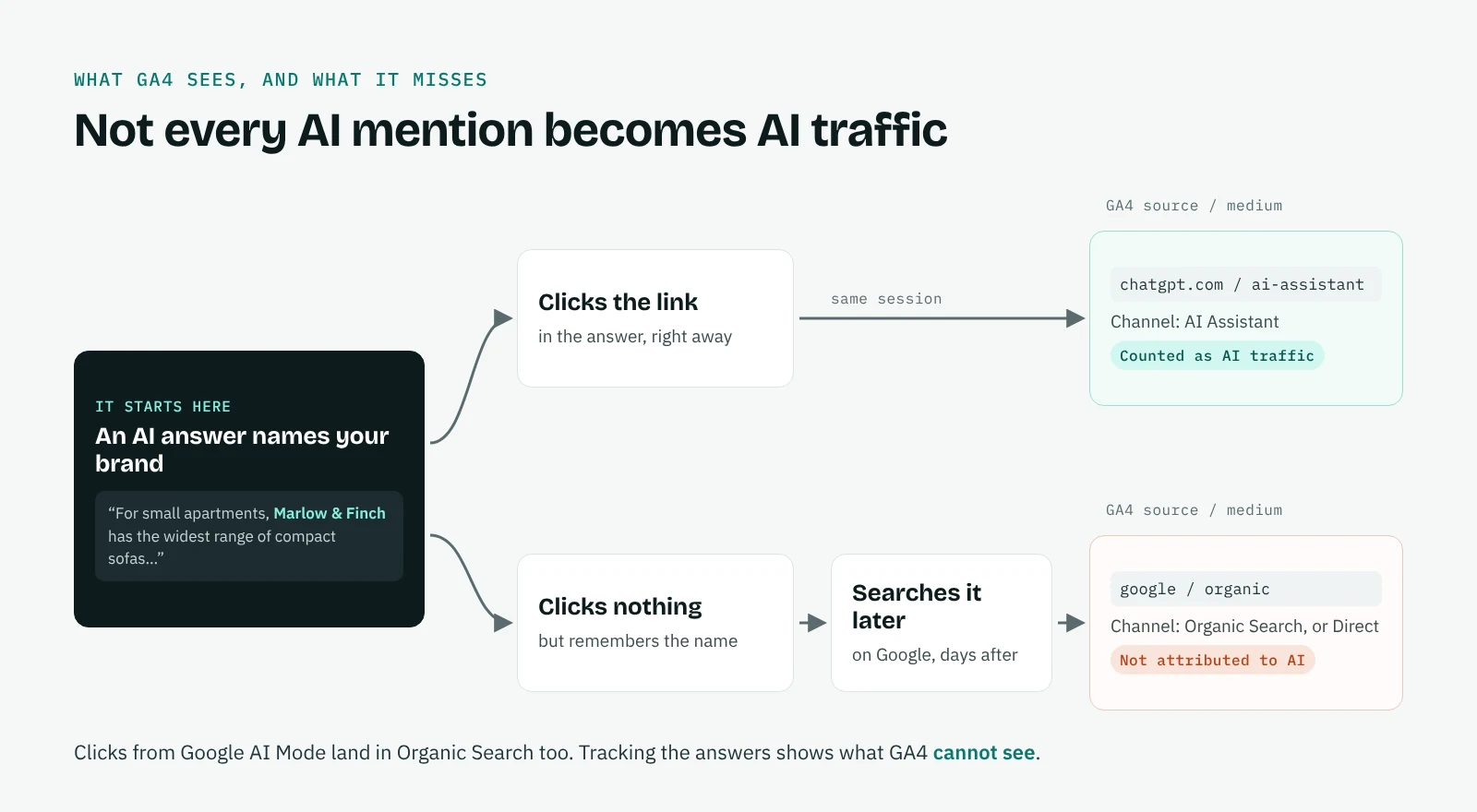
To measure AI influence completely, you need a second source of data: the answers themselves. That means asking ChatGPT, Gemini, Perplexity, Claude and Google AI Mode the questions your customers ask, at regular intervals, and recording whether your brand is named, in what position and on the strength of which sources. Our guide on how to track brand mentions in AI search explains the method, and what is GEO puts it in the wider context.
Read together, the two sources answer different questions. GA4 tells you which platforms send visits and whether those visits convert. The answers tell you where your brand is visible, where competitors are named instead, and which pages to work on. When you change something, the before and after view shows whether visibility moved, and AI Assistant sessions in GA4 should follow over the next weeks.
QuotedBy collects the answers in your own Chrome, for free. It types your questions on the five platforms, saves each answer with its sources and a dated screenshot, and turns them into an AI visibility score you can put next to your GA4 numbers. Each platform has its own page: ChatGPT, Perplexity, Claude and Gemini.
Frequently asked questions
Does GA4 track ChatGPT traffic?
Yes. Since May 2026, visits from links clicked in ChatGPT appear in the AI Assistant channel as chatgpt.com / ai-assistant. Visits without a referrer, such as some from the ChatGPT app, can still land in Direct.
Is Perplexity included in the AI Assistant channel?
Google does not name Perplexity in its examples, but in the property we checked in October 2026, perplexity.ai visits landed in AI Assistant with the medium ai-assistant. Check your own Traffic acquisition report to confirm.
Does Google AI Mode count as AI Assistant traffic?
No. Clicks from Google AI Mode and AI Overviews are counted in Organic Search, and GA4 has no dimension to separate them from classic results.
Why is my AI traffic in Direct?
When a visit arrives without a referrer, from an app, an in-app browser or a copied link, GA4 cannot tell where it came from and counts it as Direct.
Is the AI Assistant channel retroactive?
Google has not said so, and in many properties it starts on 13 May 2026. For earlier data, use a custom channel group, which applies to reports retroactively.
Why did my referral traffic from ChatGPT drop?
It probably moved. Since May 2026, GA4 assigns the medium ai-assistant to visits from recognized AI assistants, so they leave Referral and appear in the AI Assistant channel.