Is it possible to track brand mentions in AI search?
Yes, although no AI platform will do it for you. There is no Search Console for ChatGPT and no report in Gemini that shows how often your brand comes up. Whatever you learn, you learn by asking.
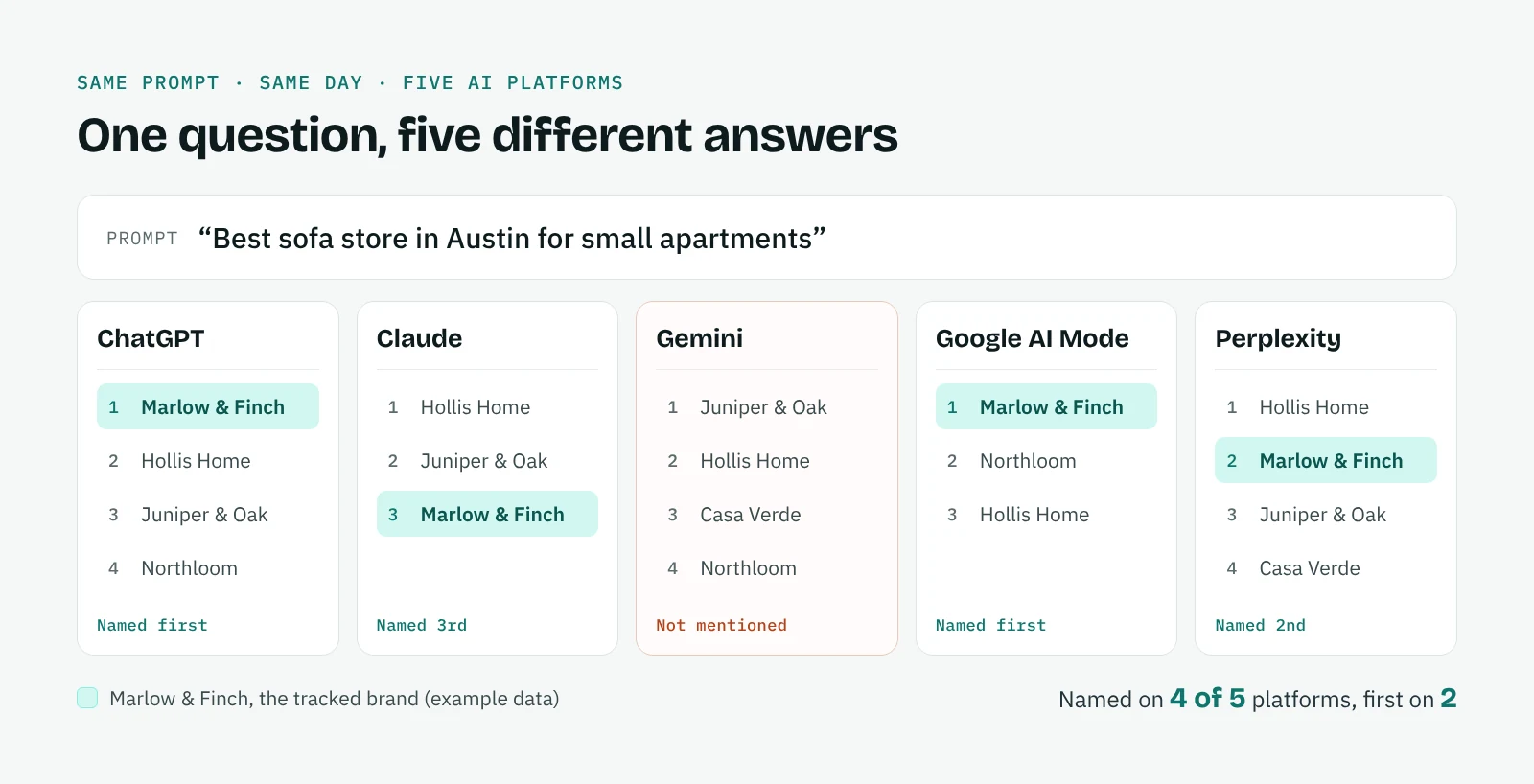
The method that works is sampling. You choose a fixed set of questions, ask them on the same platforms at regular intervals and compare the results over time. A single answer proves little, because the same question can return a different list of brands an hour later. A trend across several weeks is what tells you where a brand really stands, and whether the work you are doing is moving it.
Why AI mentions are harder to track than Google rankings
Classic rank tracking gives you a number: position 3 for a keyword, on a given day, in a given city. AI answers do not work that way. A brand can be named first, named fifth, described in a full paragraph or left out entirely, and each of these outcomes means something different for the business. Instead of a position, you are measuring presence, order and the way the AI talks about you. That shift is what generative engine optimization is about, and our guide has GEO and SEO compared point by point.
Answers also move more than search results. The model, the web pages retrieved at that moment, the account and the location all change what comes back. Each platform has its own habits with sources too: Perplexity and Google AI Mode show their links next to the answer, while ChatGPT, Gemini and Claude cite pages mainly when they search the web.
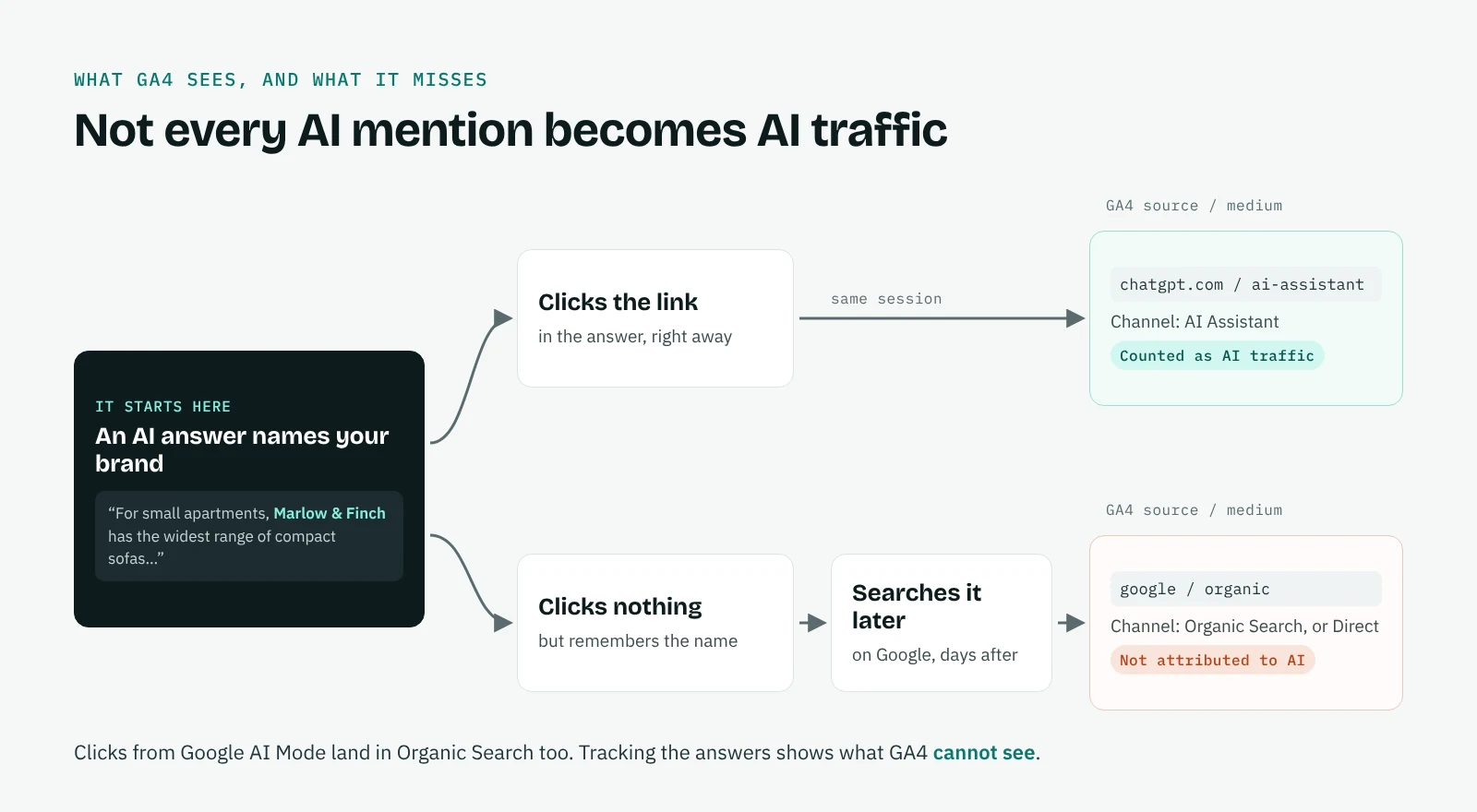
Then there is the measurement gap. GA4 records a visit from chatgpt.com or perplexity.ai only when someone clicks a link in the answer. A user who reads your name, closes the chat and searches for you on Google the next day never appears as AI traffic. GA4's AI Assistant channel, added in May 2026, only counts clicks from assistants such as ChatGPT and Gemini, and clicks from Google AI Mode and AI Overviews stay inside Organic Search. For many brands that invisible share is the larger one, and the only way to see it is to look at the answers themselves. Our guide explains how to track AI traffic in GA4 and where it stops. To see that share, watch who searches for your brand later and ask new customers how they found you.
How to track brand mentions in AI search, step by step
Step 1. Choose the questions your customers ask
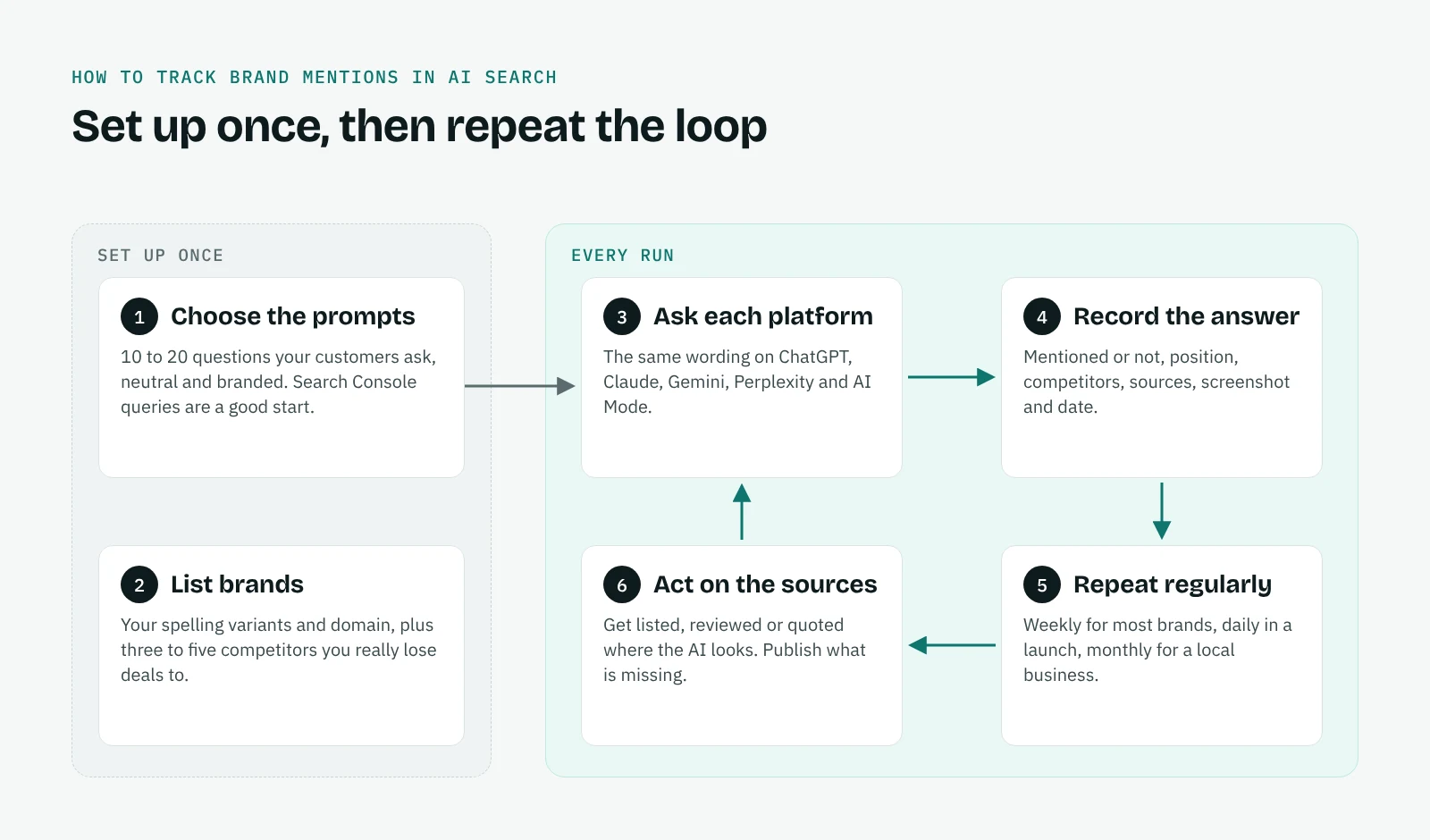
Start with 10 to 20 prompts and resist adding more until the first runs are done. Mix two kinds. Neutral questions, such as "best accountant in Austin" or "Asana vs Trello for a small team", measure visibility: does the AI think of you without being prompted? Questions that name your brand measure reputation: what does the AI say when someone asks about you directly? Your Search Console queries are a good place to find the first set, because they show how people already phrase their needs.
Step 2. List your brand variants and competitors
AI answers rarely spell a brand the way your style guide does. Note every variant you can think of, your domain and the names of your main products, so that "Marlow & Finch" and "Marlow and Finch" count as the same brand. Then add three to five competitors: the ones you lose deals to, not only the biggest names in the market.
Step 3. Ask every prompt on every platform
Use exactly the same wording on each platform, signed in to the kind of account your customers would use. Changing a word between platforms makes the comparison meaningless, and so does mixing a logged-out session with a logged-in one.
Step 4. Record what each answer says
For each answer, note whether the brand appears, where it comes in the list, how it is described, which competitors are named and which sources are cited. Save the full text, the links, a screenshot and the date. The screenshot matters more than it seems: answers change, and when a client asks to see the evidence weeks later, it is the only proof you have.
Step 5. Repeat on a schedule
Weekly is the right rhythm for most brands. During a launch or a campaign, daily runs show the effect sooner; for a small local business, once a month is often enough. Consistency matters more than frequency: same prompts, same platforms, similar intervals.
Step 6. Act on the sources
The pages an AI relies on are the clearest signal of what to do next. If the answers in your category keep citing two review sites and a trade directory, that is where your brand needs to be listed, reviewed or quoted. If they cite a competitor's guide, that is the content you need to publish. Our page on AI citation tracking explains how to read sources in more depth.
Three ways to track brand mentions in AI search
Once the method is clear, the real choice is how much of it you do by hand.
| By hand | API-based platforms | QuotedBy | |
|---|---|---|---|
| Cost | Free | Monthly subscription, usually priced per prompt or per answer | Free plan; Pro at 24 € a month |
| Answers | The ones customers see | Generated through APIs, which can differ from the consumer apps | The ones customers see, from your own signed-in browser |
| Effort per run | Copy and paste every answer into a spreadsheet | None, runs on its own | QuotedBy types the prompt and saves the answer; AI Mode, ChatGPT and Perplexity usually start on their own, on Claude and Gemini you press Enter |
| Proof | Screenshots you take yourself | Usually text only | Text, links and a screenshot with the date |
| Where data lives | Your files | The vendor's servers | Your browser |
Doing it by hand is fine for a first look at five prompts, and it teaches you a lot about how each platform answers. It stops being practical as soon as you track more than one brand or need to repeat the check every week.
Tools of both kinds are often called LLM visibility checkers. API-based platforms suit large brands with hundreds of prompts and a budget to match. They run on their own, which is their main strength, but their answers come from APIs and may not match what people see in the apps. If budget is the question, see the free AI rank trackers compared.
QuotedBy sits in between. It runs in your Chrome with your own accounts, so the answers are the ones your clients' customers see, and it removes the copying and pasting without taking you out of the loop.
How QuotedBy tracks brand mentions
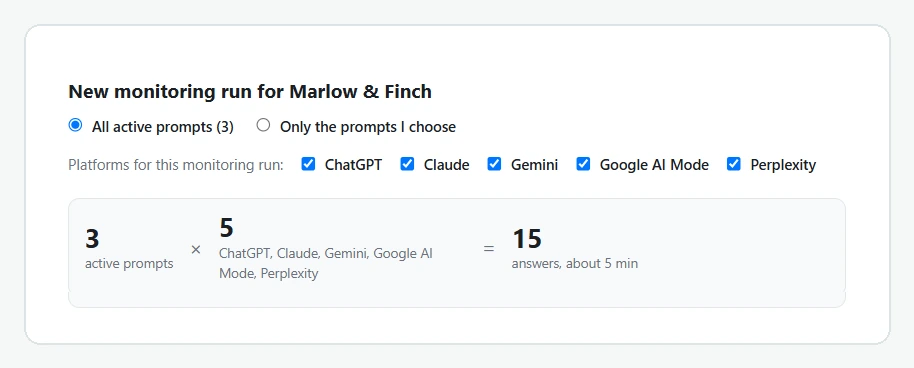
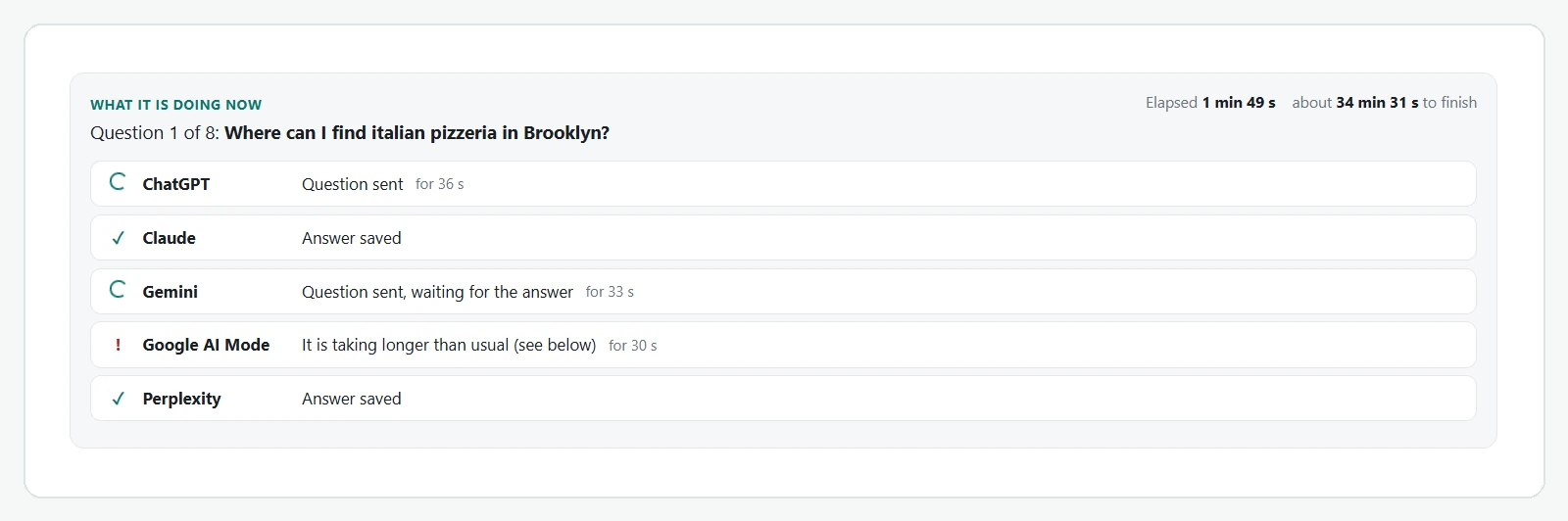
When you start a run, QuotedBy opens ChatGPT, Claude, Gemini, Google AI Mode and Perplexity in a Chrome tab group, one tab per platform, and types the prompt for you. Google AI Mode starts on its own from its search address and ChatGPT and Perplexity usually do too; on Claude and Gemini, or whenever a chat only types the question, you press Enter. QuotedBy then waits for each answer to finish, saves it and moves to the next prompt. Before you start, it tells you how many answers the run will collect and roughly how long it will take. Each platform has its own page with the details: ChatGPT, Google AI Mode, Perplexity, Claude and Gemini.
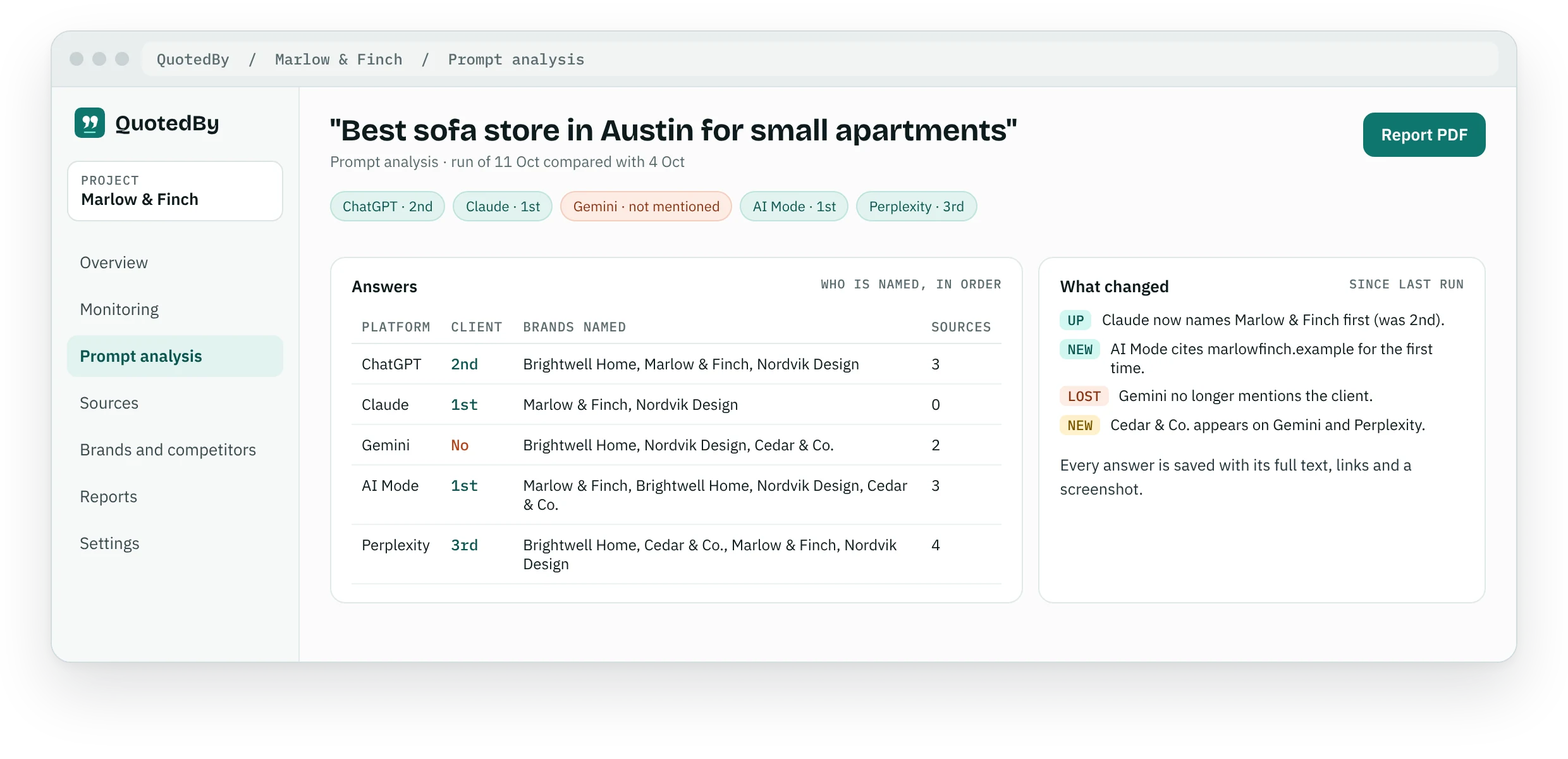
Every saved answer is read for you. Brand variants and domains are recognised, so a mention counts even when the spelling differs. For each prompt you see whether your brand appears, whether it comes first and which competitors are named before it. Businesses the AI keeps naming that you are not tracking yet are flagged as possible competitors, which is often the most surprising finding of a first run. Our guide explains how to run an AI competitor analysis from these results.
Behind each answer you find its sources, ranked by how often they appear, and the full evidence: text, links and a screenshot with the date. Across the whole project, the AI visibility overview puts your client next to each competitor platform by platform, and the comparison with the previous run shows prompts gained or lost, new competitors and new sources. When it is time to share results, the data becomes a PDF report your client can read in five minutes.
Runs follow a reminder you set for each project, daily, weekly or monthly at the time you choose, so tracking never depends on remembering it. All answers are stored in your browser, not on our servers: here is how your data is handled. The complete list of what QuotedBy does is on the features page.
Start free, upgrade when you need more
The Free plan includes one project, three competitors, 20 active prompts, all five AI platforms and 90 days of visible history, with analysis by Chrome's built-in AI on devices that support it. It is enough to track one brand properly, not a trial in disguise.
Pro, at 24 € a month, is for freelancers and small teams working on several clients: 10 projects, 15 competitors per project, 80 active prompts and full history. It adds built-in AI analysis with no API key, alerts when a client drops out of a prompt, a before and after view of your changes and PDF reports with your own logo.
Frequently asked questions
Is there a tool to see if ChatGPT mentions my brand?
Yes. QuotedBy asks ChatGPT your prompts in your own browser and records whether your brand is named, in what position and next to which competitors. It does the same on Gemini, Perplexity, Claude and Google AI Mode. More on the ChatGPT rank tracker page, and on how to get your brand into ChatGPT answers in our guide.
How often should I track brand mentions in AI search?
Weekly is enough for most brands. Track daily during a launch or a campaign, and monthly for a small local business with few changes.
Which AI platforms should I track?
Start with the ones your customers use. For most markets that means ChatGPT and Google AI Mode first, then Perplexity, Gemini and Claude. QuotedBy covers all five on the Free plan.
Why does the same prompt give different answers?
AI answers depend on the model, on the web results retrieved at that moment, and on the account and location. That is why a single check is not enough: compare runs over time.
Do I need an API key?
No. QuotedBy uses the AI accounts you already have in Chrome. Pro includes built-in AI analysis with no key to set up.
Can GA4 show when an AI mentions my brand?
Only partially. GA4 groups visits from links clicked in assistants such as ChatGPT and Gemini in its AI Assistant channel, while Google AI Mode clicks are counted as Organic Search. It does not see answers that name you without a click. Tracking the answers themselves fills that gap. More in how to track AI traffic in GA4.