"How did you hear about us?" is a question you ask new customers or leads to learn where they first came across your brand. It records a self-reported lead source: what the person remembers, not what a tracking cookie saw. That is exactly why it is useful. It captures the word of mouth, the podcast, the colleague's recommendation and, more and more often, the answer from ChatGPT that analytics never sees.
This guide gives you a list of options to copy, examples for different businesses, advice on where and how to ask, and a method to send the answers to GA4 so you can compare what people say with what your tracking says.
Does "how did you hear about us" still matter?
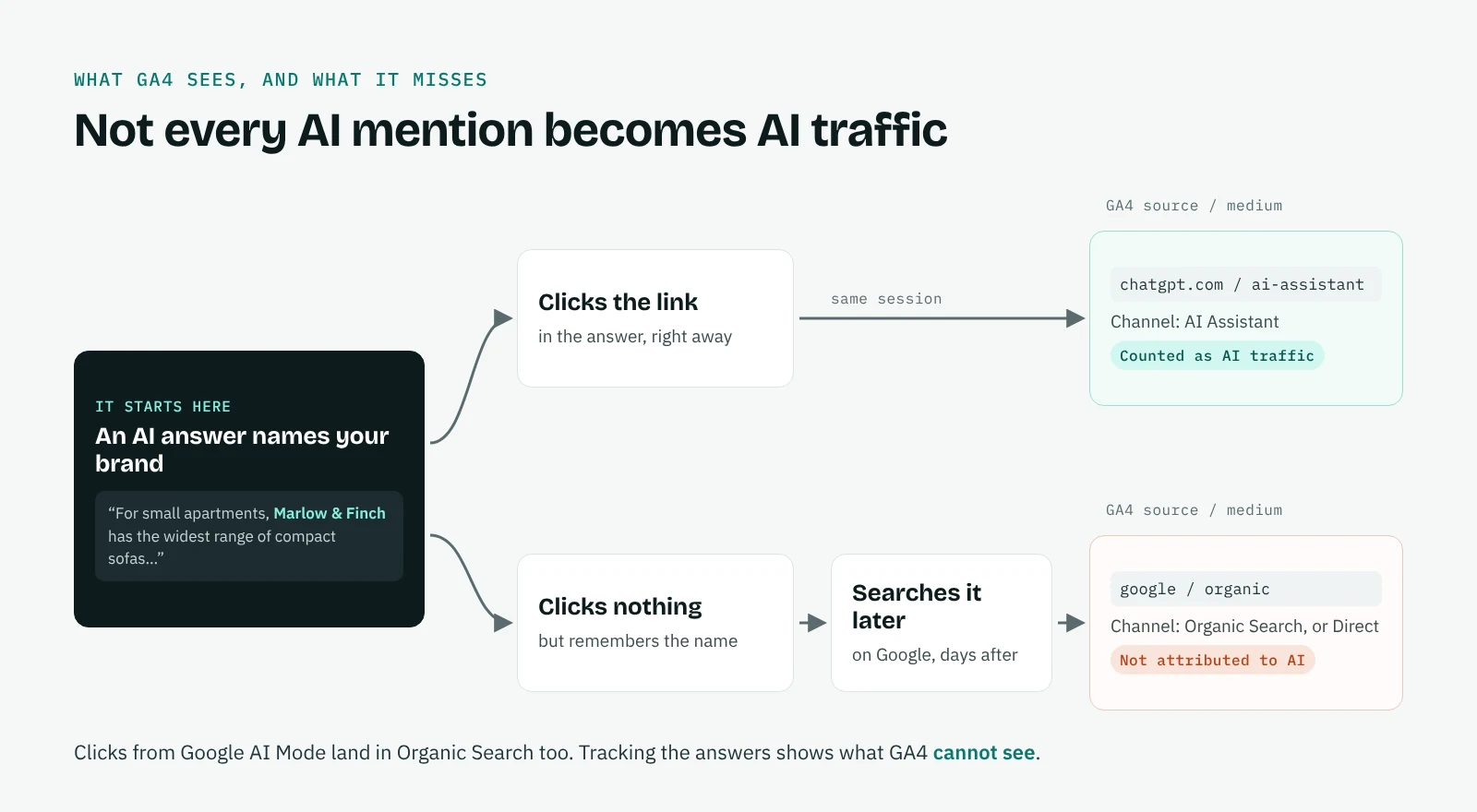
More than before. Analytics records the last step before a visit: a click, a search, a link. It does not record what made someone search for you in the first place. Someone who reads your name in a ChatGPT answer and searches for you on Google two days later shows up in GA4 as organic search. Someone who copies your link from an AI app often shows up as direct. The AI recommendation that started it all is invisible.
Asking the question fills that gap. It will never be precise, because memory is imperfect, but it shows the sources tracking cannot see, and it shows them in your customers' words. Our guide on tracking AI traffic in GA4 explains what GA4 does and does not attribute to AI.
How did you hear about us: options to use
Keep the list between six and ten options, specific enough to act on and short enough to read in a few seconds.
| Option | Why it is there |
|---|---|
| Google or another search engine | Classic search, still the largest source for most sites |
| AI assistant (ChatGPT, Gemini, Perplexity, Claude, Copilot) | Recommendations in AI answers, invisible in most analytics |
| Social media | Organic posts and creators; ask which network in a follow-up |
| Friend, colleague or word of mouth | The source tracking misses most often |
| Review site or comparison article | Third-party pages that also feed AI answers |
| Podcast, video or YouTube | Audio and video mentions with no link to click |
| Newsletter, blog or press article | Editorial coverage |
| Event or conference | Offline contact |
| Advertising | Paid campaigns |
| Other (please specify) | A free text field for everything else |
The AI assistant option is the one most forms still lack. If you add only one change after reading this guide, add that one, and let people pick which assistant in a second question or a short follow-up list.
Two details improve the data. Show the options in random order, except Other at the bottom, to avoid people always picking the first. And use words your customers use: "ChatGPT" is clearer than "generative AI platform".
Multiple choice or open text?
Multiple choice gives clean data you can count. Open text gives richer answers ("my accountant mentioned you", "ChatGPT recommended you for small offices") but needs to be read and grouped. The best compromise for most businesses is a short multiple-choice list with an Other field, plus an optional open question for detail. If you get many open answers, an AI model can group them into your categories in minutes.
Where and when to ask
Ask at the moment you get the most answers with the least friction: in the sign-up or contact form for B2B and services, at checkout or in the confirmation page for e-commerce, during the booking for local businesses, and in the first sales call for high-value deals. A short post-purchase survey works too, though fewer people answer it.
Making the question required gives you an answer from everyone, but some answers will be random clicks. Optional questions get fewer answers that are usually more honest. If you make it required, keep the list short and include "I don't remember".
Examples and templates
B2B software sign-up form. "How did you first hear about us?" with the options above, then, if the answer is AI assistant, "Which one?" with ChatGPT, Gemini, Perplexity, Claude, Copilot and Other.
E-commerce checkout. "Where did you discover our store?" with six options: Google, AI assistant, Instagram or TikTok, a friend, a review or blog, Other.
Local business booking. "How did you find us?" with Google Maps, Google search, AI assistant, a friend or neighbour, a sign or flyer, Other.
Sample answers people give under Other are worth reading every month. They often name a specific article, video or AI answer you did not know existed.
How to send the answers to GA4
Answers kept only in your CRM cannot be compared with your traffic. Sending them to GA4 makes that comparison possible.
- When the form is submitted, send the answer as a parameter of the event you already track, such as generate_lead, sign_up or purchase. For example, a parameter called heard_about with values like ai_assistant, search, social, friend, and a second parameter heard_about_detail for the assistant or network named.
dataLayer.push({
  event: 'generate_lead',
  heard_about: 'ai_assistant',
  heard_about_detail: 'chatgpt'
});- In GA4, open Admin, then Data display, then Custom definitions, and register both parameters as event-scoped custom dimensions.
- Build a free-form exploration with heard_about as rows and First user primary channel group as columns, and your key event count as the value.
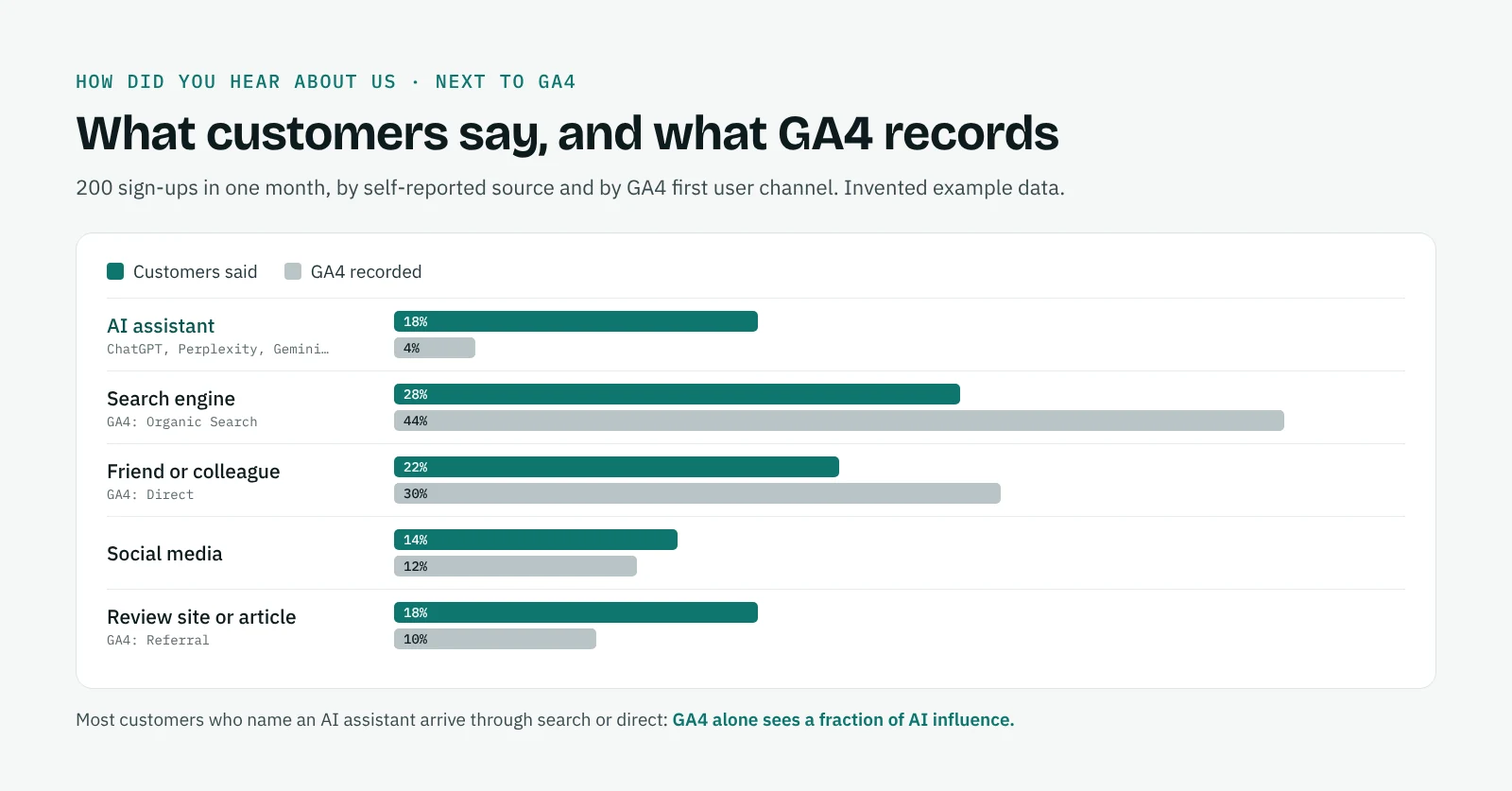
The result is a table that shows, for example, how many customers who say they found you through an AI assistant are recorded by GA4 as organic search or direct. That gap is the share of AI influence your analytics alone would have missed.
What to do with the answers
When "AI assistant" grows among your answers, find out which questions and which answers are sending people your way. That means looking at the AI answers themselves: which platforms name you, for which questions, in what position and next to which competitors. Our guide on how to track brand mentions in AI search explains the method, and the platform pages for ChatGPT, Perplexity and Google AI Mode show how each one behaves.
Read the answers next to your branded search trend, too: people who heard about you from an AI often search for your name before they buy.
QuotedBy collects the AI answers in your own Chrome, for free, on ChatGPT, Gemini, Perplexity, Claude and Google AI Mode, so you can see what your customers read before they found you.
Frequently asked questions
Does "how did you hear about us" really matter?
Yes. It records sources analytics cannot see, such as word of mouth, podcasts and recommendations in AI answers. It is imprecise, but it is the only data that comes from the customer's own memory.
What are good "how did you hear about us" options?
Search engine, AI assistant, social media, friend or colleague, review site, podcast or video, newsletter or press, event, advertising and Other with a text field.
Should I add ChatGPT as an option?
Yes, as part of an "AI assistant" option with a follow-up for which one. Without it, people who found you through an AI answer will pick search engine or Other.
Should the question be required?
It depends on the form. Required questions get more answers but more random ones; if you make it required, keep the list short and add "I don't remember".
How do I analyze the answers?
Count answers by option every month, read the Other answers, and send the answer to GA4 as an event parameter so you can compare it with the tracked channel.