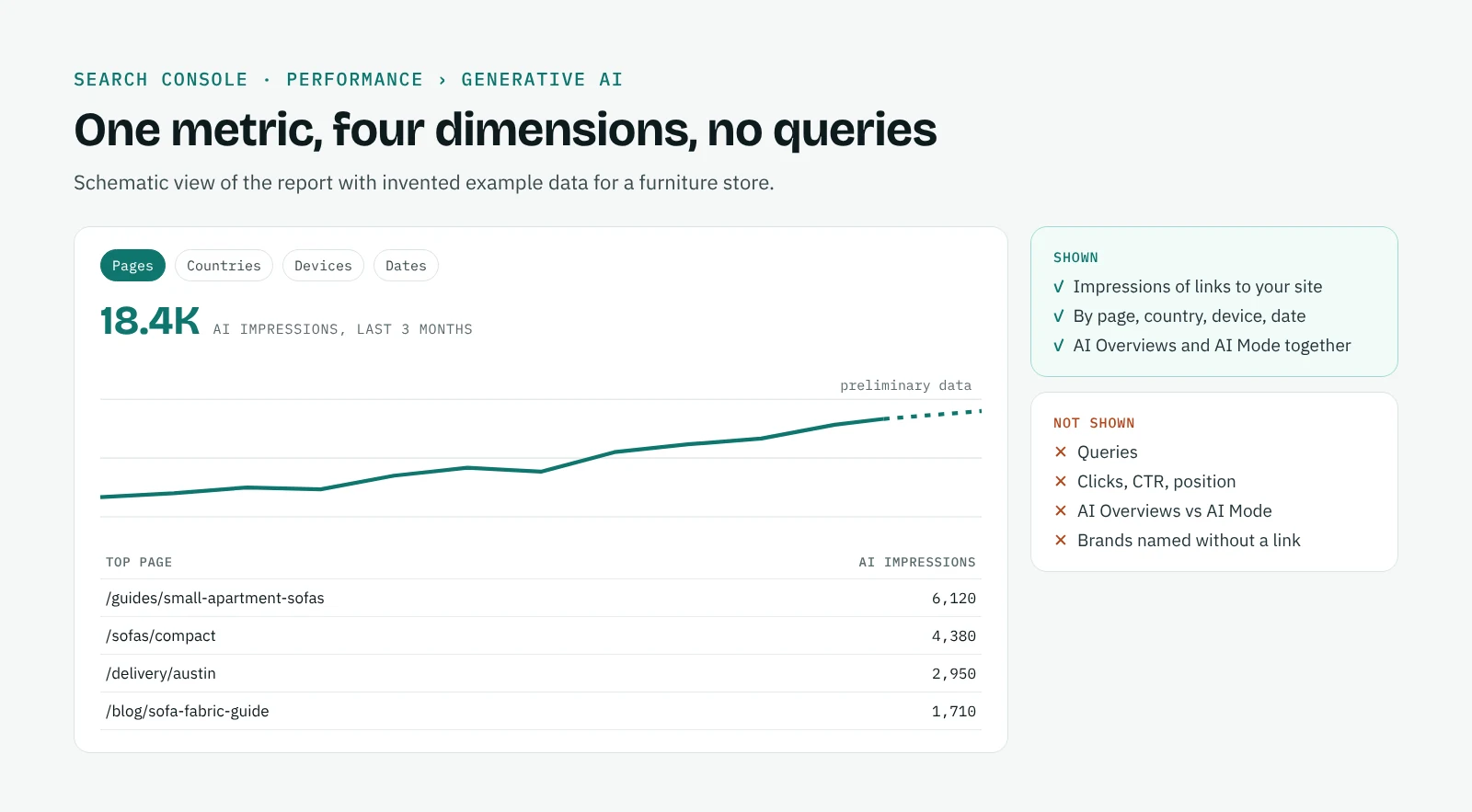
The Generative AI report in Search Console shows how many times links to your site appeared in Google's AI Overviews and AI Mode, by page, country, device and date. You find it under Performance, in the left menu, as Generative AI. Google introduced it on 3 June 2026 for a first group of sites, starting in the UK, and opened it to all sites on 31 August 2026.
It is the first official data Google gives on its AI features, and it is useful. It is also narrow: it counts impressions and nothing else. This guide explains exactly what the report measures, what it leaves out, and how to read it together with the Performance report and GA4 so that the numbers lead to decisions.
What the Generative AI report shows
| What the report gives you | |
|---|---|
| Metric | Impressions only |
| Features covered | AI Overviews and AI Mode, together; Search Labs experiments excluded |
| Dimensions | Pages, countries, devices, dates |
| Pages | Grouped by canonical URL, after redirects |
| Dates | Hourly, daily, weekly or monthly, in Pacific Time |
| Fresh data | The latest hours are preliminary, shown as a dotted line |
| Discover | A separate Generative AI report under Discover |
An impression is counted when a link to your site is shown to someone inside a generative AI feature on Google Search. It says your page was among the sources displayed; it does not say how prominent the link was or whether anyone clicked it.
The same data is still included in the standard Performance report, inside the Web totals. The new report does not add traffic you were missing: it isolates the AI part so you can see it.
What the report does not show
The gaps matter as much as the data, because they decide what you can conclude.
No queries. You see which pages appeared, not for which searches. You cannot tell whether an impression came from a question about your brand or about your category.
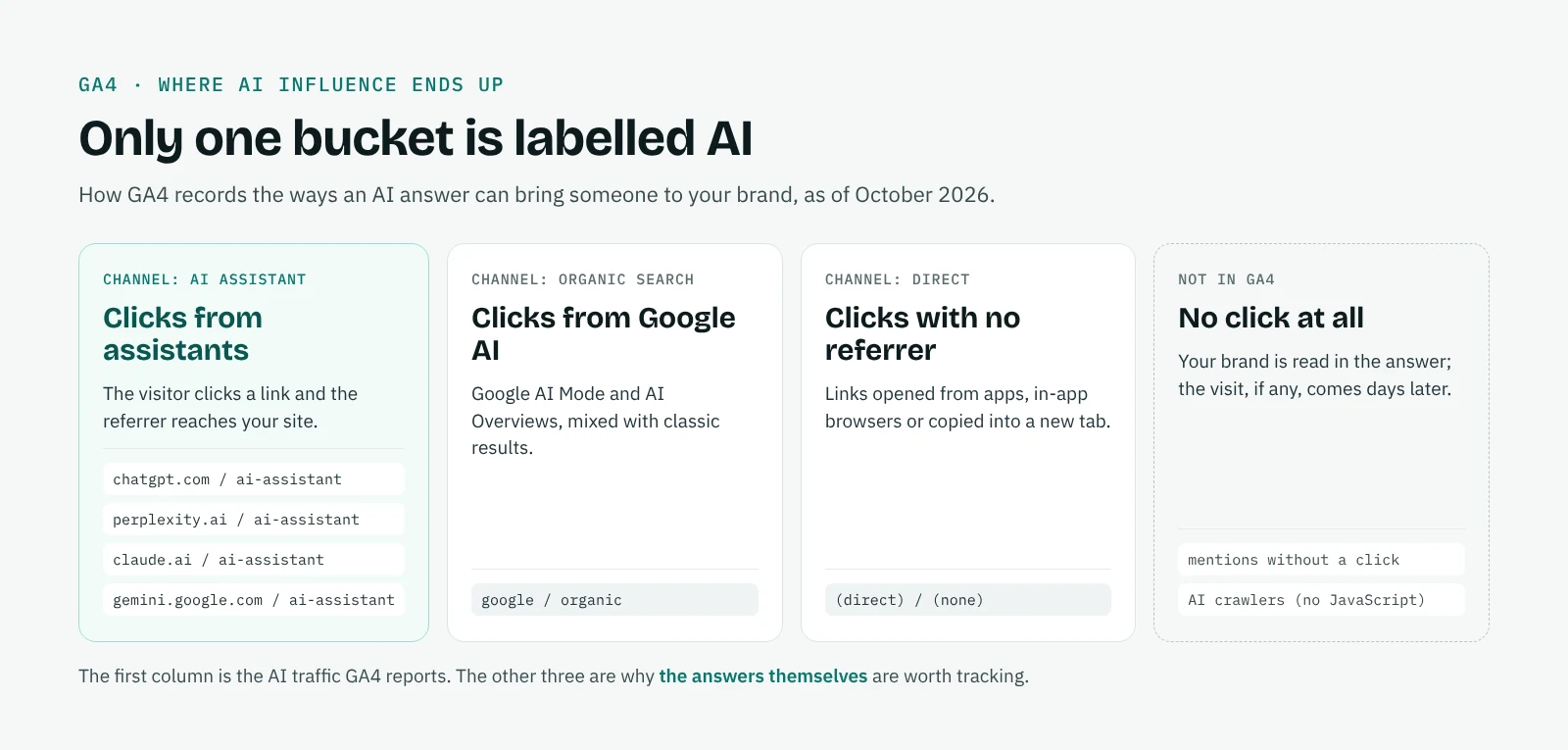
No clicks, CTR or position. You cannot calculate how many people clicked a link from an AI answer. In GA4 those clicks sit inside Organic Search, mixed with classic results.
No split between AI Overviews and AI Mode. Both features are reported together, so a change in the report can come from either.
No brands. The report counts links to your site. It does not show whether your brand was named without a link, which competitors were named, or how you were described. Those are the questions the answers themselves answer.
How to read it in practice
Find the pages Google uses as sources
Sort the Pages table by impressions. The pages at the top are the ones Google's AI already trusts for your topics. They are worth protecting: keep them accurate, up to date and fast, and avoid restructuring them without a reason.
Compare AI impressions with classic impressions
For the same page and period, put the AI impressions next to the page's total impressions in the Performance report. The ratio gives a rough measure of how much of that page's visibility now happens inside AI answers. Treat it as a direction, not a precise share, since the two reports count different things.
Look for pages that rank but are never used
Pages with plenty of classic impressions and no AI impressions are your most interesting gap. They rank, yet Google's AI does not pick them. Check whether they answer the follow-up questions a topic implies, whether a competitor covers the subject more completely, and whether a snippet control such as nosnippet or a low max-snippet limits what Google can quote. Our guide on how to rank in Google AI Overviews and AI Mode covers what Google says helps.
Read changes over weeks, not days
After you update a page, compare four weeks of AI impressions before and after, not single days: AI features vary and the latest data is preliminary. Note the date of each change, so you can connect it to the curve later.
Check countries and devices
AI features do not roll out everywhere at once, and they look different on mobile. A sudden rise in one country often reflects Google expanding a feature there rather than anything you did.
How to fill the gaps
Three other sources complete the picture.
GA4 shows what visitors do once they arrive. Clicks from AI Overviews and AI Mode are in Organic Search, while clicks from ChatGPT, Perplexity, Claude and Gemini have their own AI Assistant channel. Our guide on tracking AI traffic in GA4 explains both.
Branded search in the Performance report shows whether more people look for you by name, which is often the visible effect of being recommended by AI. Our guide on branded search shows how to measure it with Search Console's branded queries filter.
The answers themselves show the questions, the brands named, their order and the sources cited. QuotedBy collects them for Google AI Mode, and for ChatGPT, Perplexity, Claude and Gemini, in your own Chrome. It does not track AI Overviews. Our page on the Google AI Mode tracker compares what each tool can tell you, and AI citation tracking explains how to read the sources.
The setting that controls inclusion
Google states that to appear in its generative AI features, a site must be included in them in Search Console. Inclusion is the default. If you opt out, your pages stop appearing as sources in AI Overviews and AI Mode, and the report will show no impressions. Check this setting first if your report is empty and you expected data.
Frequently asked questions
Where is the Generative AI report in Search Console?
Under Performance, in the left menu, as Generative AI. Discover has its own Generative AI report.
Why is my Generative AI report empty?
Usually because your site has not yet collected enough impressions in AI Overviews and AI Mode, or because it is excluded from generative AI features in Search Console.
Can I see which queries triggered AI Overviews for my site?
No. The report shows pages, countries, devices and dates, but no queries.
Does the report show clicks from AI Overviews?
No. It shows impressions only. Clicks from AI Overviews and AI Mode are counted in the standard Performance report and in GA4's Organic Search, mixed with classic results.
Can I separate AI Mode from AI Overviews?
Not in the report: both are counted together.
Does the report include ChatGPT or Perplexity?
No. It covers Google's own AI features only. Visits from ChatGPT, Perplexity, Claude and Gemini appear in GA4's AI Assistant channel.