Features
Everything you need to track a brand in AI answers
From the first question to the report for your client, in one Chrome extension. QuotedBy follows the way an SEO works: prepare a project, collect real answers, understand what the AI says and why, and deliver a report your client can read in five minutes. New to GEO? Start here.
AI analysis
An analyst for your whole project, and for every prompt
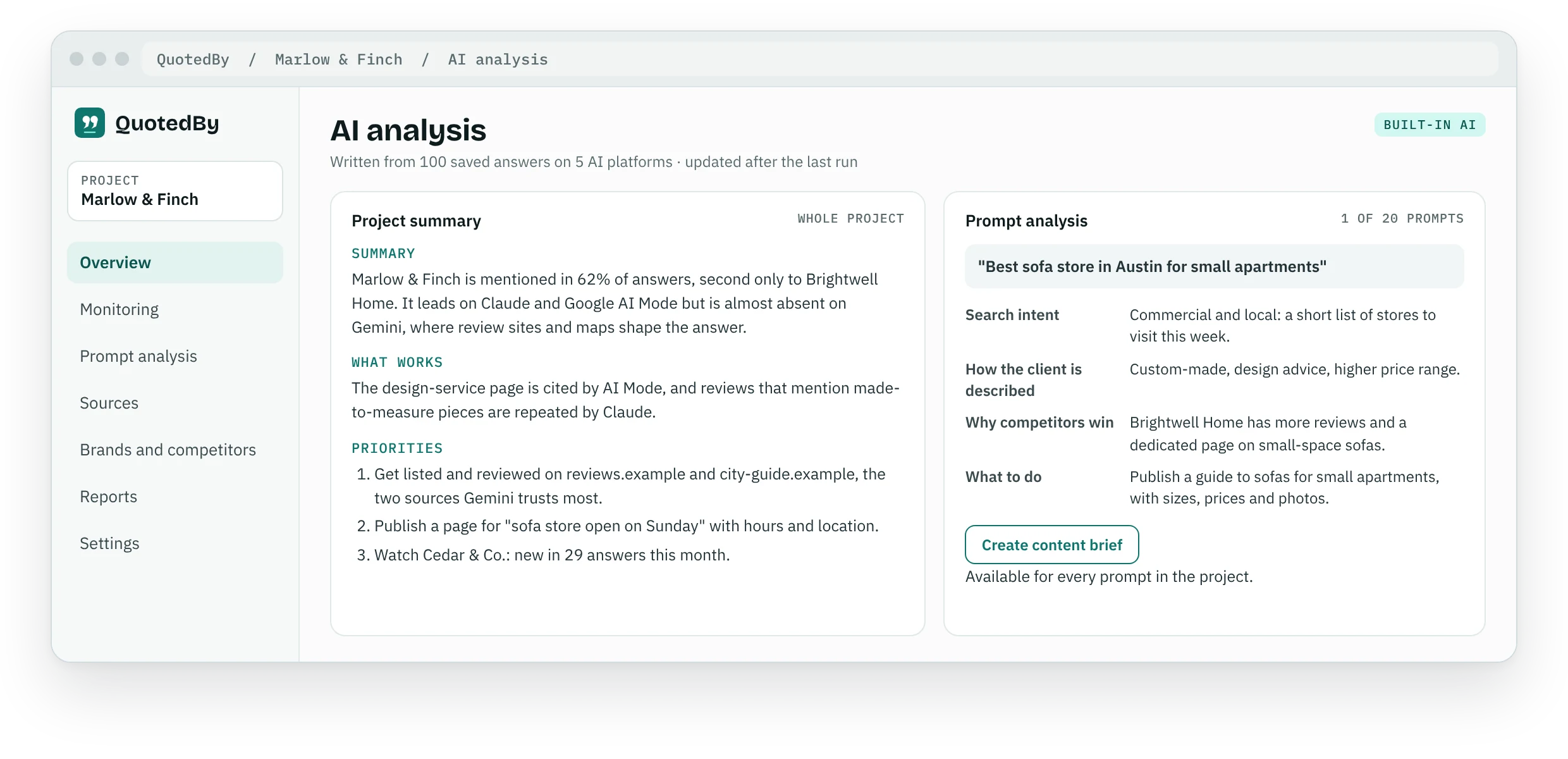
Reading a hundred AI answers takes hours. QuotedBy reads them for you and writes the analysis: what is happening across the project, and what is happening in each single question.
Project summary
Where the brand stands across the five AI platforms, what is working, where competitors are ahead and the priorities to work on next, in plain words you can paste into a report.
Every prompt, analysed
For each question: the search intent, how the AI describes your client, why competitors win and what to do about it.
What changed, explained
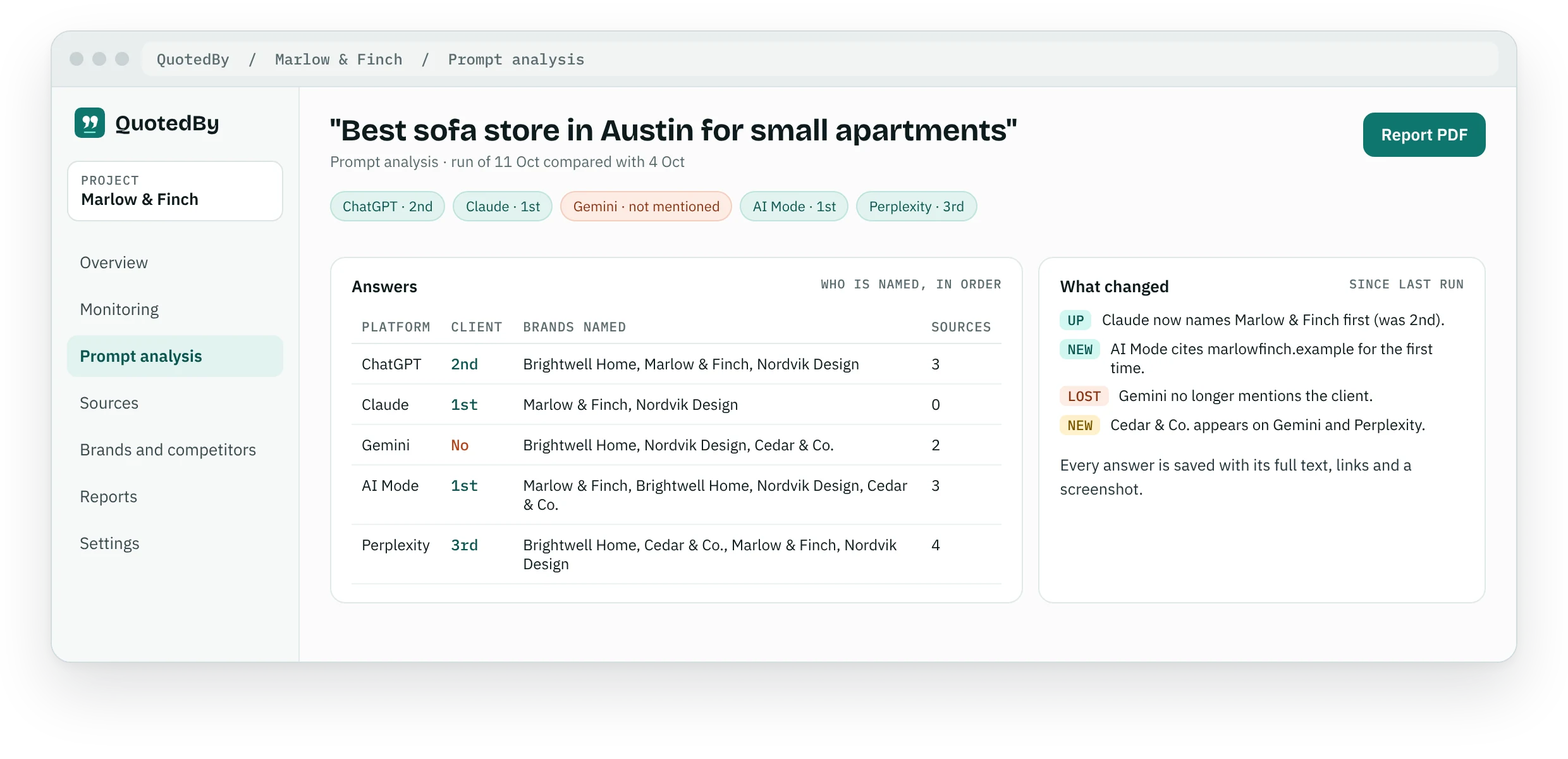
From the second run, the analysis of each prompt explains what changed since the previous one and which information to verify, so you know where to look first.
Built in, no setup
Pro includes our built-in AI: no API key, no extra cost, no limits in normal use. On Free, the analysis runs with Chrome's built-in AI when your device supports it.
Set up a project in minutes
A project is one brand: its name, its website, its competitors and the questions its customers ask. The guided setup takes you through it in a few minutes.
Guided setup
Brand, website, competitors and prompts, step by step, with suggestions at every stage. You can change everything later.
Brand variants
Add synonyms and spellings, so "Marlow & Finch" and "Marlow and Finch" count as the same brand in every answer. Domains are recognised too.
Prompt ideas from Search Console
Paste your Search Console queries and get the questions people would ask an AI. Ready-made suggestions help you cover intents like comparisons, prices and local searches.
AI prompt suggestions PRO
The AI proposes new prompts from your brand, your services and your queries, and flags those that are too similar to the ones you already track.
Real answers from five AI platforms
QuotedBy works in your own Chrome, with the AI accounts you already use. No API approximations: the answers are the ones your clients' customers see.
Assisted monitoring
QuotedBy opens ChatGPT, Claude, Gemini, Google AI Mode and Perplexity in a tab group, one tab per platform, and types each prompt for you. Google AI Mode starts on its own and ChatGPT and Perplexity usually do too; on Claude and Gemini you press Enter. QuotedBy saves every answer when it is complete.
Proof for every answer
Full text, links and a screenshot, stored with the date. When a client asks "where did you see that?", you can show them.
Reminders
Choose how often to run each project, daily, weekly or monthly, at the time you choose, and QuotedBy reminds you when it is time.
Nothing lost
If a tab needs you, for example to sign in again, QuotedBy brings it to the front and tells you what to do. Missing answers can be completed later.
Manual capture
Reading an interesting answer? Save it to the right project with one click, from any supported chat.
Platform guides: ChatGPT rank tracker Google AI Mode tracker Perplexity rank tracker Claude rank tracker Gemini rank tracker
What the AI says, and why
Numbers, sources and observations are calculated for you, prompt by prompt and across the whole project, as soon as the answers are saved.
Overview
Visibility by platform, your client against each competitor, and the priorities: prompts where the client is missing and other businesses the AI keeps naming.
Prompt analysis
For each question: who is mentioned, who comes first, how the client is described and which sources back the answer, platform by platform.
Cited sources
The domains and pages the AI relies on, ranked by how often they appear, to plan content, reviews and digital PR where they count.
What changed
The difference from the previous run, prompt by prompt: positions gained or lost, new competitors, new sources.
Alerts PRO
A notification at the end of a run when your client drops out of a prompt or a new competitor appears.
Impact of your changes PRO
Log what you did, like a new page or a review campaign, and see the before and after on visibility, first mentions and sources.
Reports your clients understand
Turn the data into a document you can send the same day, without copying numbers into slides.
PDF reports
A professional document for a prompt or a whole project, with cover, contents, findings, the AI analysis, sources and method.
Your brand PRO
Your logo on the cover and in the footer instead of QuotedBy, so the report is your deliverable.
Export PRO
CSV and JSON of answers and links, for your own dashboards, Looker Studio or spreadsheets.
Backup
Save and restore all your projects with one file, or move them to another computer.