Sooner or later every client asks the same question: "are we showing up in ChatGPT?". Answering it once is easy. Answering it every month, in a way the client understands and can compare with last month, is the hard part. This guide gives you a complete AI visibility report template, section by section, with what to put in each one, where the data comes from and what to say when the numbers are noisy.
The template works with any tool, or with a spreadsheet and screenshots. It assumes a fixed set of questions tracked on the AI platforms your client cares about, which is the method described in our guide to AI competitor analysis.
What an AI visibility report has to answer
A client does not want every answer the assistants gave. They want three things: where they stand, what changed and what you will do next. Every section of the report exists to support one of those answers, and anything that does not can go to the appendix.
Two more things make a report credible over time. The first is a stable method: the same questions, platforms and country every month, so this month can be compared with the last one. The second is evidence: the actual answers, with dates, so nobody has to take a percentage on trust. Reports that skip these two tend to work once and then lose the client's confidence the first time a number drops.
The template, section by section
Nine sections, in this order. For a small client the whole report fits in six to eight pages; the appendix can be as long as it needs to be.
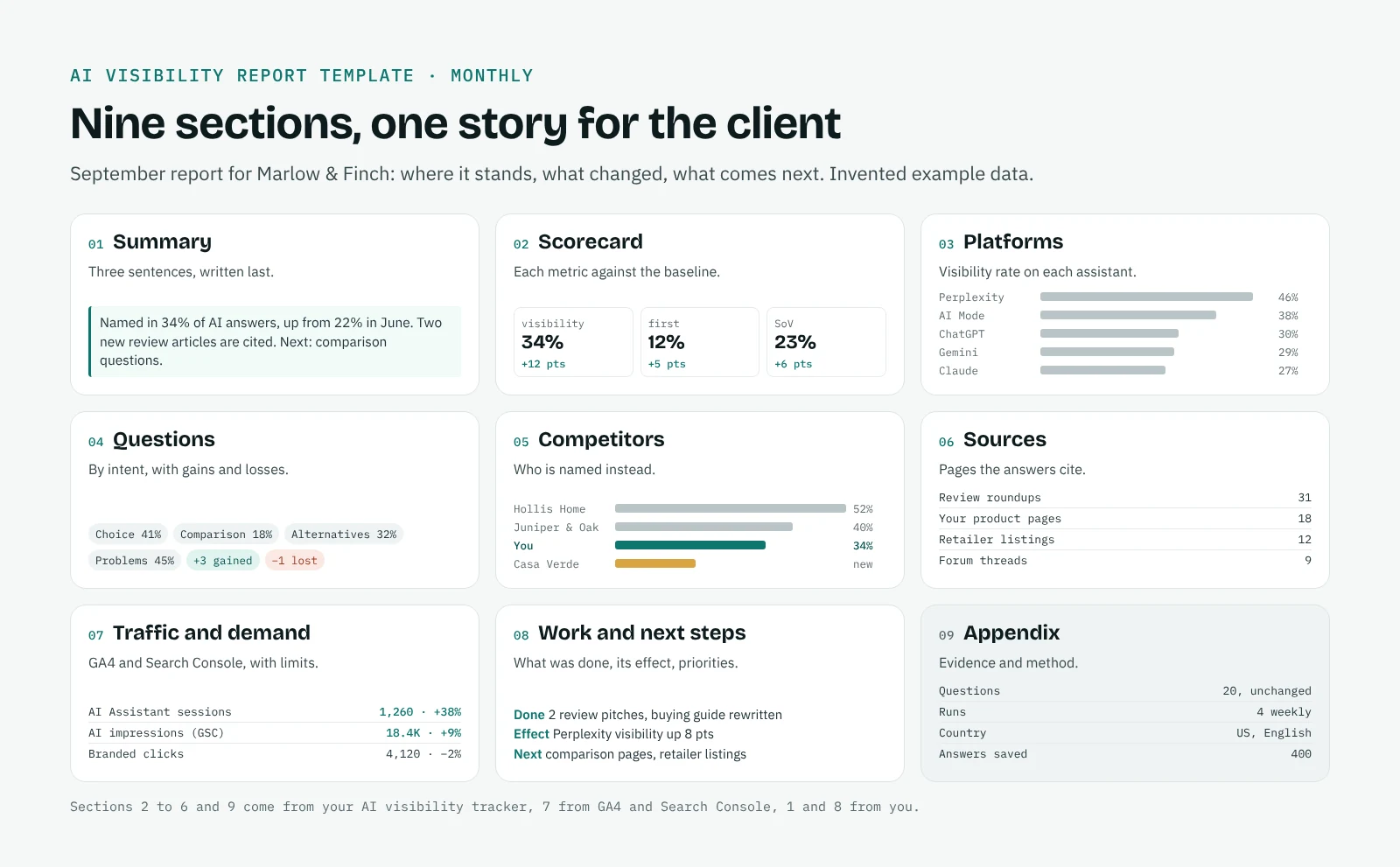
| # | Section | What goes in | Data source |
|---|---|---|---|
| 1 | Summary | Three sentences: where the brand stands, the biggest change since last month, the priority for next month | Your reading of sections 2 to 8 |
| 2 | Scorecard | Visibility rate, first-mention rate and share of voice, each against last month and the baseline | Your AI visibility tracker |
| 3 | Platforms | The same metrics for each platform: ChatGPT, Gemini, Perplexity, Claude, Google AI Mode | Your AI visibility tracker |
| 4 | Questions | Results by group of questions (choice, comparison, alternatives, problems), with the ones gained and lost | Your AI visibility tracker |
| 5 | Competitors | Who is named instead of the client, and new brands appearing in the answers | Your AI visibility tracker |
| 6 | Sources | The pages the assistants cite, split into the client's own pages and third-party pages | Citations in the answers |
| 7 | Traffic and demand | AI Assistant sessions and key events in GA4, AI impressions in Search Console, branded clicks | GA4, Search Console |
| 8 | Work and next steps | What was done last month and its effect, then the priorities for next month | Your notes, before and after comparison |
| 9 | Appendix: evidence and method | The question list, platforms, country, dates and number of runs, plus the answers themselves | Your AI visibility tracker |
1. Summary
Write it last and put it first. Three sentences, no jargon: "Marlow & Finch was named in 34% of AI answers in September, up from 22% in June. The gain came from two new review articles that ChatGPT and Perplexity now cite. Next month we focus on the comparison questions, where Hollis Home is still named first." If the client reads nothing else, they have what they need.
2. Scorecard
Three metrics are enough. Visibility rate is the share of answers that name the brand. First-mention rate is the share of answers where it is named first. Share of voice is the brand's mentions divided by the mentions of all the brands you track. Show each one next to last month and next to the baseline, the first month you measured. The baseline matters more than the previous month: AI answers move from one run to the next, and a comparison with the starting point is what shows real progress. Our page on the AI visibility score explains the three metrics in more detail.
3. Platforms
The same three metrics, one row per platform. Clients are often surprised by how different the platforms are, and this table explains a lot of what follows: a brand strong on Perplexity and weak on ChatGPT has a problem with different sources, not with its whole content strategy.
4. Questions
Group the questions by intent rather than listing all of them: "choosing a product", "comparisons", "alternatives to a competitor", "problems the product solves". For each group, give the visibility rate and name the questions gained and lost since last month. This is the section where the client recognises their own market, so use their words.
5. Competitors
Who is named when the client is not, and in which groups of questions. Include any new brand that started appearing this month, even if nobody considered it a competitor: in AI answers, a competitor is whoever the assistants recommend in your place. The method is in our guide to AI competitor analysis.
6. Sources
The pages behind the answers, sorted by how often they are cited, split between the client's own pages and third-party ones such as review sites, directories, forums and articles. This section usually holds the most practical opportunities: a review article that cites three competitors and not the client is a concrete task for next month. See AI citation tracking for how to collect them.
7. Traffic and demand
This is where AI visibility meets the data the client already knows. Three figures are worth including, each with one honest line about its limits:
- AI Assistant sessions and key events in GA4. The default channel groups visits from ChatGPT, Gemini, Perplexity, Claude and other assistants. It misses AI Overviews and AI Mode, which count as Organic Search, and every mention that does not lead to a click. Our guide on how to track AI traffic in GA4 shows how to build the report.
- AI impressions in Search Console. The Generative AI report counts impressions of the client's pages in AI Overviews and AI Mode, together, with no queries or clicks.
- Branded clicks. If more people meet the brand in AI answers, more of them search for it by name later. The trend in branded search is an indirect signal, worth showing next to the visibility rate.
If you also report classic SEO, this section can sit inside your usual monthly report rather than in a separate document. Our guide to SEO KPIs shows a combined scorecard.
8. Work and next steps
List what was done last month (a page rewritten, a review campaign, a comparison article published) and, for each action, what changed in the questions it was meant to affect. Then give three priorities for next month, each linked to a finding above. A report that ends with clear next steps gets read; one that ends with charts gets filed. QuotedBy's before and after view measures one action at a time, which makes this section much easier to write.
9. Appendix: evidence and method
The question list, the platforms, the country and language, the dates and the number of runs, plus the answers themselves with the brands and sources highlighted. Most clients never open it, but the ones who do are usually the ones who decide whether to renew. If you change the question list, say so here and mark the change in the charts: a new set of questions is a new series, not a rise or a fall.
How to present AI visibility data honestly
AI answers are not rankings. The same question can get a different answer an hour later, and personal settings, location and account history all play a part. A few habits keep the report credible:
Report on several runs, not one. Run the questions weekly and report monthly, so each figure rests on four runs rather than a single snapshot.
Show trends against the baseline. A move of two or three points in one month is often noise; a steady rise over three months is not.
Keep the evidence one click away. When a client doubts a number, the answer is the screenshot, not a longer explanation.
Say what the data cannot see. No tool has access to the internal systems of Google or OpenAI, and Google says so explicitly in its guidance for AI features. Third-party tracking measures what the assistants answered to your questions, which is useful, but it is not an official metric.
What not to promise a client
Some promises come back to haunt you. Do not promise a fixed position in any AI assistant, because there is none. Do not present one good answer as a result; wait until it repeats. Do not promise results from a single technical change such as an llms.txt file or extra structured data: Google lists both among the tactics that do not help its AI features. And do not equate AI visibility with traffic: many people read the recommendation and then search for the brand or type its address, which shows up as organic or direct traffic.
What you can promise is a clear method, honest numbers and a list of actions that are tested month after month.
Monthly or quarterly?
Monthly for the report, quarterly for a review. The monthly report follows the template above and should take less than an hour once the tracking runs on its own. The quarterly review steps back: is the question list still right, have new competitors appeared, are the priorities still the ones with the biggest effect? It is also the right moment to add or retire questions, so the monthly series stays comparable in between.
Building the report with QuotedBy
QuotedBy runs your questions in your own Chrome on ChatGPT, Claude, Gemini, Perplexity and Google AI Mode, keeps every answer with its sources, and creates the AI visibility report as a PDF: cover, contents, summary, findings, AI analysis, sources and method, with a "prepared by" field for your name or agency. Most of the template above comes out of it directly; sections 7 and 8 are where you add GA4, Search Console and your own notes.
The free plan covers one client project with PDF reports carrying the QuotedBy mark. Pro, at 24 € a month, adds your own logo on the report, up to 10 projects, CSV and JSON export for Looker Studio, and before and after measurement. QuotedBy does not track AI Overviews or Copilot.
Frequently asked questions
What should an AI visibility report include?
A short summary, a scorecard with visibility rate, first-mention rate and share of voice, results by platform and by group of questions, competitors, cited sources, AI-related traffic from GA4 and Search Console, the work done and next steps, and an appendix with the evidence and the method.
How often should I send an AI visibility report to a client?
Monthly, based on weekly runs of the same questions, with a quarterly review of the question list and priorities.
Can I combine AI visibility with my SEO report?
Yes. Add the scorecard and the traffic section to your monthly SEO report, and keep the question-by-question findings and evidence in an appendix or a separate document.
What metrics show AI visibility in GA4?
The AI Assistant default channel shows sessions and key events from assistants such as ChatGPT, Gemini, Perplexity and Claude. It does not include AI Overviews or AI Mode, which are counted as Organic Search.
Is there a free AI visibility report template?
The nine sections in this guide are a complete template you can copy into a document or a slide deck. QuotedBy also creates a PDF report for free for one project.