Why Google AI Mode needs its own tracking
AI Mode is the conversational side of Google Search. Instead of a page of results, it splits the question into several searches, reads what it finds and writes a single answer with links to the pages it relied on. For many questions, especially comparisons and "best" searches, that answer is all the user reads.
For an SEO this is the closest AI to classic search, because it draws on Google's own index. Good rankings help, but they do not guarantee a place in the answer: AI Mode picks a few brands and a few sources, and a site on page one can be left out while a review site on page two is quoted. Your rank tracker will not show this, because AI Mode is not a list of positions. You need to read the answers. Our guide on how AI answers relate to SEO shows what Google documents about it.
What Search Console and GA4 cannot tell you about AI Mode
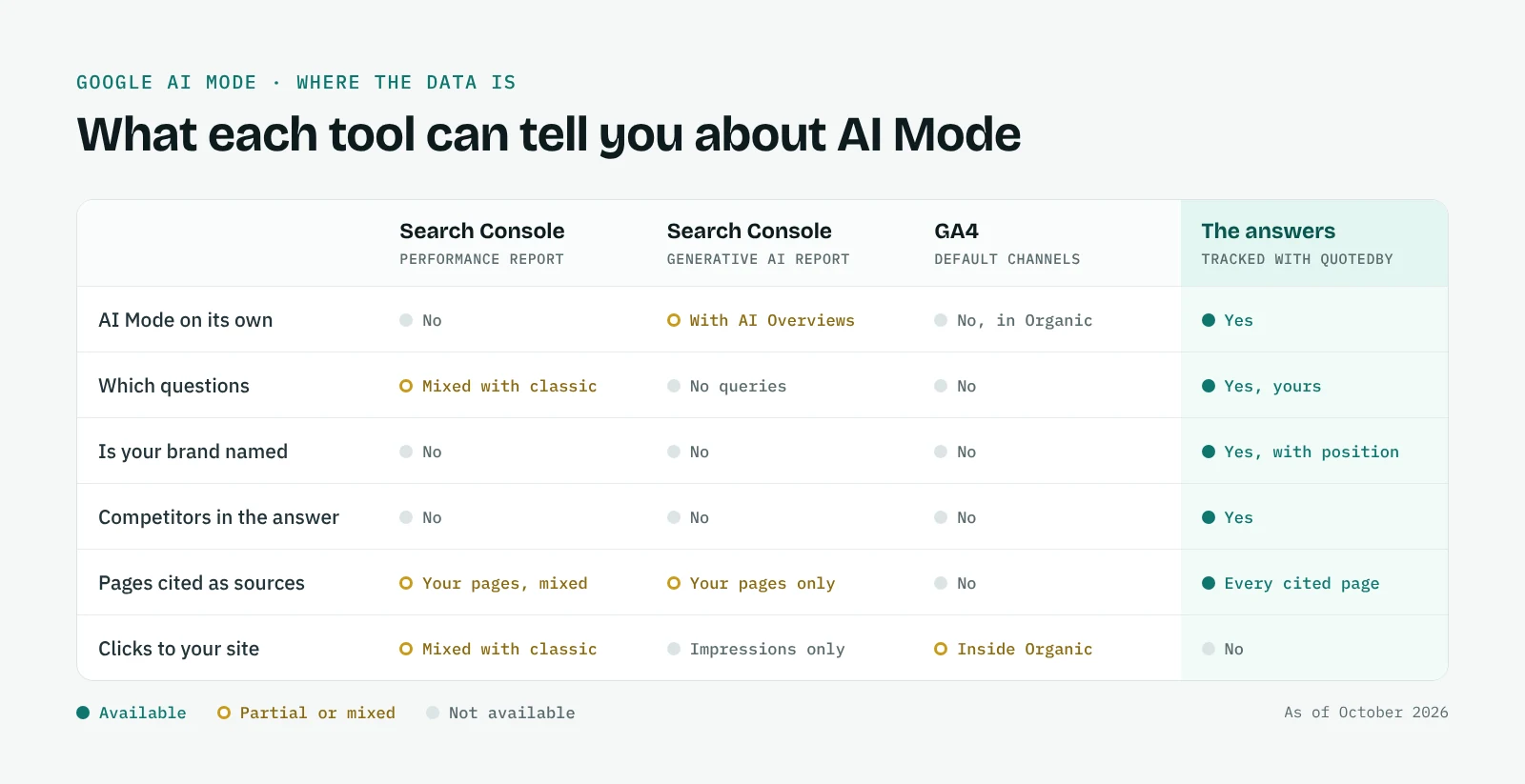
Google does count AI Mode in its tools, but never on its own. Since June 2025, impressions and clicks from AI Mode are included in Search Console's Web search totals, mixed with classic results and with no filter to separate them. The generative AI report, available to all sites since August 2026, adds a dedicated view, but it shows impressions only, puts AI Overviews and AI Mode together and does not list queries. Our guide explains how to read the Search Console Generative AI report.
GA4 has the same blind spot. A click from AI Mode lands in the Organic Search channel, exactly like a click on a blue link, while the AI Assistant channel added in May 2026 covers assistants such as ChatGPT and Gemini, not Google's own AI features. And neither tool can see the user who reads your name in an answer and comes back days later by typing your brand. Our GA4 guide explains what GA4 shows for AI Mode and for the other assistants.
So the data tells you that something is happening in AI Mode, not what. Which questions bring you into the answers, which competitors appear instead of you and which pages Google quotes: that only shows in the answers themselves. Our guide on how to track brand mentions in AI search explains the method behind it.
What to track in AI Mode
AI Mode rank tracking comes down to three questions. The first is whether you are mentioned at all, and where: a brand named in the opening line is in a very different position from one listed fifth. The second is who else is there, because the competitors AI Mode names are often not the ones you meet in classic results.
The third is the sources. AI Mode shows its links next to the answer, and two things can happen that classic SEO does not prepare you for: your page can be cited while your brand is never named, or your brand can be named on the strength of someone else's page, such as a directory, a review or a local article. Both are worth knowing. The first is a content opportunity, the second shows you where your reputation is really being built. Our page on AI citation tracking goes deeper on this.
How QuotedBy tracks your brand in AI Mode
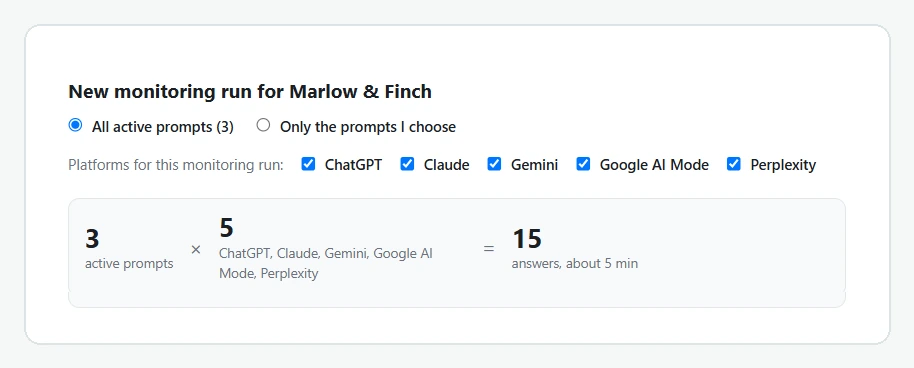
You set up a project once, with your brand, its spelling variants, your website, a few competitors and the questions to track. When you start a run, QuotedBy opens AI Mode in a tab with the first question already in the search address, so it starts by itself; on the same run you can include ChatGPT, Claude, Gemini and Perplexity in parallel tabs. QuotedBy waits for the answer to finish, saves it and moves on.
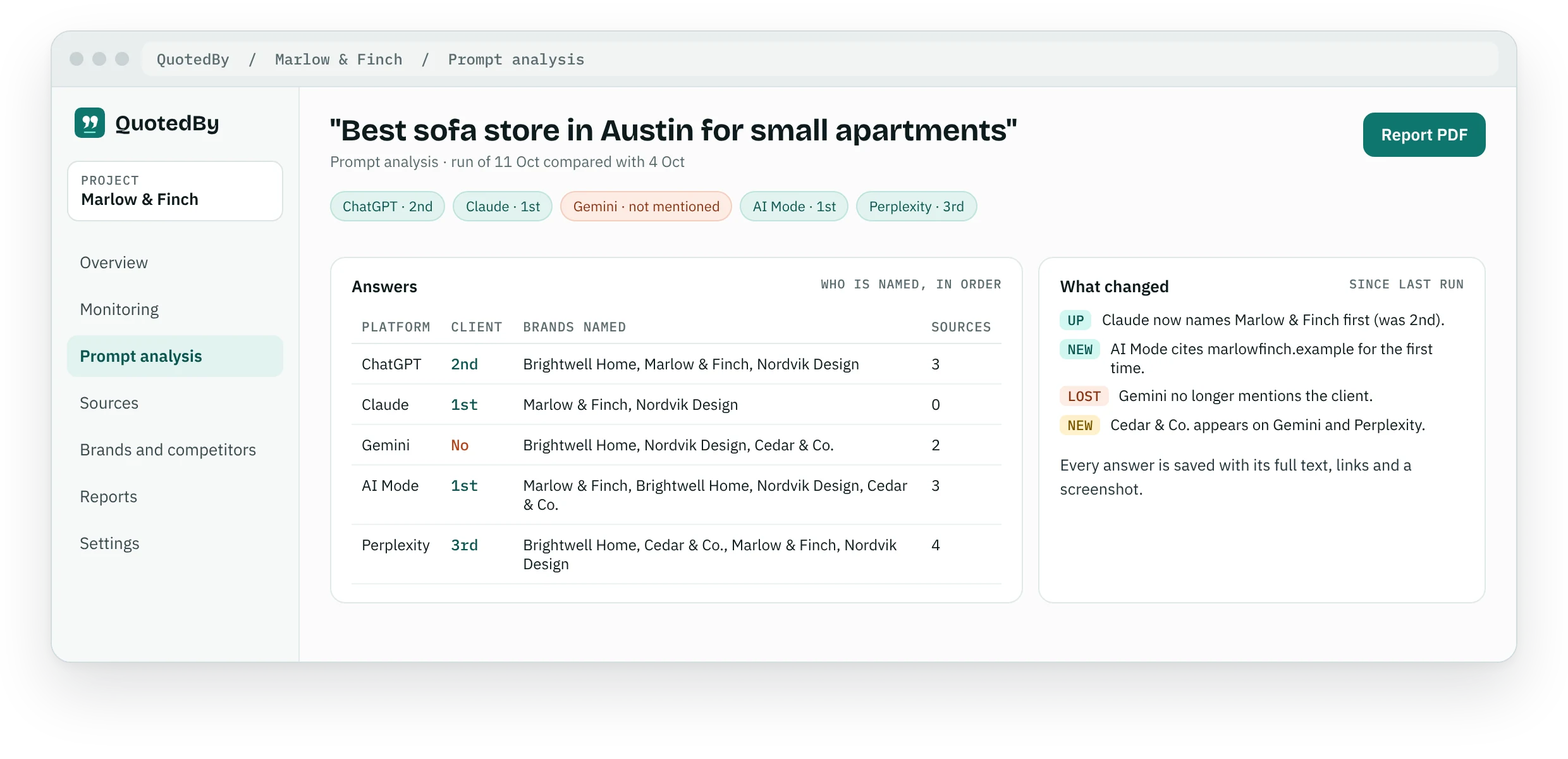
Each answer is read for you: whether your brand appears, in what position, which competitors come first and which pages are cited, ranked by how often they come back across your questions. Every answer is kept with its full text, links, a screenshot and the date, so you can show a client exactly what Google's AI said and when.
Like every Google search, AI Mode adapts to the country, language and location of the search. QuotedBy opens it set to the United States when you use the extension in English and to Italy when you use it in Italian, and within that country the answers can still reflect where you are. For a local business in another city, write the city in the question ("best sofa store in Austin") rather than relying on location alone, and keep the wording identical from one run to the next.
After each run you see what changed: questions where you appeared or disappeared, positions gained or lost, new competitors and new sources. With Pro you can also log what you did, such as a new page or a review campaign, and see the before and after on your AI Mode visibility.
Free AI Mode rank tracking, and what Pro adds
The Free plan tracks AI Mode for one project with three competitors and 20 active questions, together with the other four platforms, and keeps 90 days of visible history. There is no trial period and no card to enter.
Pro, at 24 € a month, is for freelancers and small teams who follow several clients: 10 projects, 15 competitors and 80 active questions, full history, built-in AI analysis with no API key, alerts when a client drops out of an answer and PDF reports with your own logo.
Frequently asked questions
Does QuotedBy track AI Overviews?
Not today. QuotedBy tracks Google AI Mode, the conversational tab of Google Search, together with ChatGPT, Claude, Gemini and Perplexity. AI Overviews, the summaries above classic results, are not monitored. Our guide explains how to rank in Google AI Overviews and AI Mode.
Do I need to press Enter for AI Mode?
No. AI Mode starts on its own from the search address. You press Enter on Claude and Gemini, and on ChatGPT or Perplexity only when they type the question without sending it.
Can Search Console show my AI Mode traffic?
Only as part of a total. AI Mode impressions and clicks are included in Search Console's Web search data without a separate filter, and the generative AI report shows impressions only, for AI Overviews and AI Mode together, without queries.
Does AI Mode give the same answer in every city?
No. Like Google Search, it adapts to location. Track local businesses with questions that name the city, and keep the same wording between runs.
Is there a free AI Mode rank tracker?
Yes. QuotedBy's Free plan includes AI Mode for one project with up to 20 questions, with no time limit. Our comparison shows what other free AI rank trackers include.