To appear in Google AI Overviews and AI Mode, a page has to be indexed, eligible to show a snippet, and among the most useful results for the searches Google runs behind the answer. There is no separate ranking system to optimize for. Google states that its AI features rely on the same core ranking and quality systems as Search, and that what people now call AEO or GEO is, for Google, the same work as SEO.
That does not mean nothing changes. Which pages get cited depends on how Google breaks a question into searches, and some popular tactics do nothing or harm. This guide sticks to what Google documents, separates it from the myths Google itself says to ignore, and ends with how to measure the result.
How Google chooses the pages behind an AI answer
Both AI Overviews and AI Mode use what Google calls query fan-out. Instead of running one search, Google splits the question into several related searches across subtopics, retrieves the best pages for each, and writes the answer from them, with links to the pages it used. That is why an AI answer often cites pages that do not rank for the exact words the user typed: they rank for one of the hidden searches.
The practical consequence is to think in topics, not single keywords. A page that answers the main question and the obvious follow-ups (cost, comparison, how long it takes, for whom it works) has more chances to be picked for one of the fan-out searches. AI Mode goes further than AI Overviews in this direction, handling longer questions and follow-ups in a conversation.
The technical requirements
Google's requirements are short. To be shown as a supporting link in AI Overviews or AI Mode, a page must be indexed and eligible to appear in Search with a snippet. There are no additional requirements: no special markup, no AI text file, no separate submission.
In practice, check four things. Googlebot can crawl the page and robots.txt does not block it. The page is indexed: the URL Inspection tool in Search Console tells you. The main content is in the HTML or renders correctly, following Google's JavaScript SEO guidance. And no snippet control, such as nosnippet or a very low max-snippet, stops Google from quoting it.
What Google recommends
Google's guidance for its generative AI features comes down to a few points, most of them familiar.
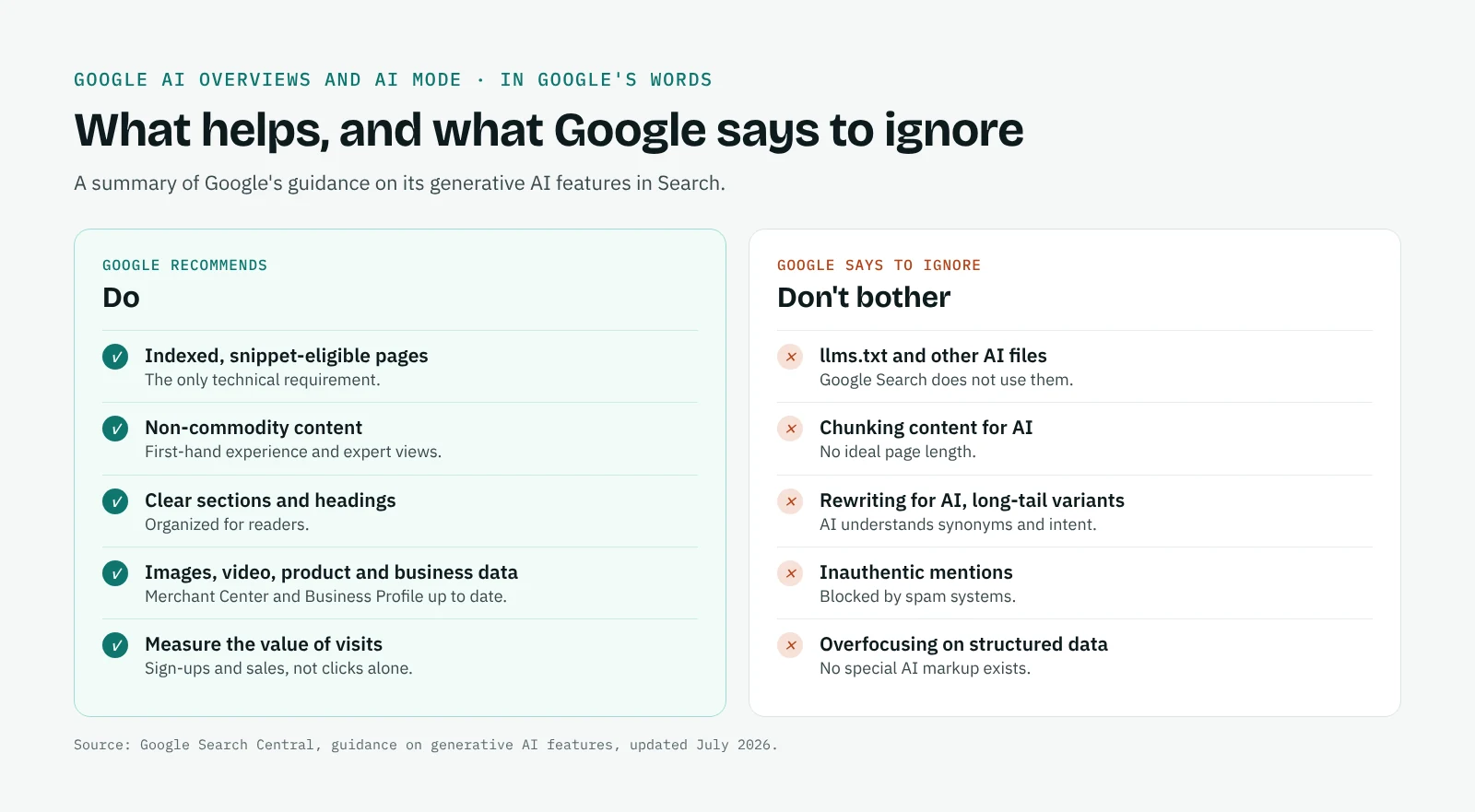
Create non-commodity content. Google favours first-hand experience and expert perspective over summaries of what everyone already says. A page that adds data, a method or a view of its own gives the AI a reason to cite it rather than any of a dozen similar pages.
Organize it for readers. Clear sections, headings and paragraphs help people and help Google find the part that answers a sub-question.
Add relevant images and video. Following image and video SEO practices supports visibility in AI features too.
Keep business and product data current. For local and shopping questions, Google draws on Google Business Profile and Merchant Center. Complete, accurate profiles and feeds matter as much as the website.
Make structured data match the page. Structured data is not required for AI features and there is no special AI markup, but where you use it, it must reflect what users see.
Measure the full value of visits. Google says clicks from its AI results tend to be higher quality, with people spending more time on the site. Judge them on sign-ups, sales and engagement, not on click volume alone.
The myths Google says to ignore
Google's July 2026 guide is unusually direct about tactics that do not help in its AI features.
| Tactic | What Google says |
|---|---|
| Creating an llms.txt or other "AI file" | Google Search does not use them. Fine for other services, but no help in Search. |
| Splitting content into small chunks | Not required. Google understands pages with several topics; there is no ideal page length. |
| Rewriting pages for AI or chasing long-tail variants | Not needed. AI systems understand synonyms and intent. |
| Seeking inauthentic mentions across the web | Blocked by Google's spam systems. |
| Overfocusing on structured data | Useful for rich results, but not a lever for AI features. |
Google also warns against mass-producing pages for every variation of a query to influence rankings or AI answers: it falls under its scaled content abuse policy.
These points apply to Google. Other AI platforms work differently: ChatGPT, Perplexity and Claude rely more on third-party pages they find through search, which is why our guide on how to improve brand visibility in AI search covers presence on cited sources as well.
How to limit what Google shows in AI answers
If you want to keep some content out of AI Overviews and AI Mode, the controls are the same as for snippets. nosnippet stops a page from being quoted, data-nosnippet hides a specific part of the page, max-snippet limits the length of what can be shown, and noindex removes the page from Search altogether. Blocking Googlebot in robots.txt is not the right tool: it controls crawling, not what is shown.
These controls apply to all of Search, not only to AI features, so use them with care: a page that cannot show a snippet will also lose its classic snippet. Google-Extended, the token that controls use of your content for Gemini, does not affect Google Search.
How to measure your visibility in AI Overviews and AI Mode
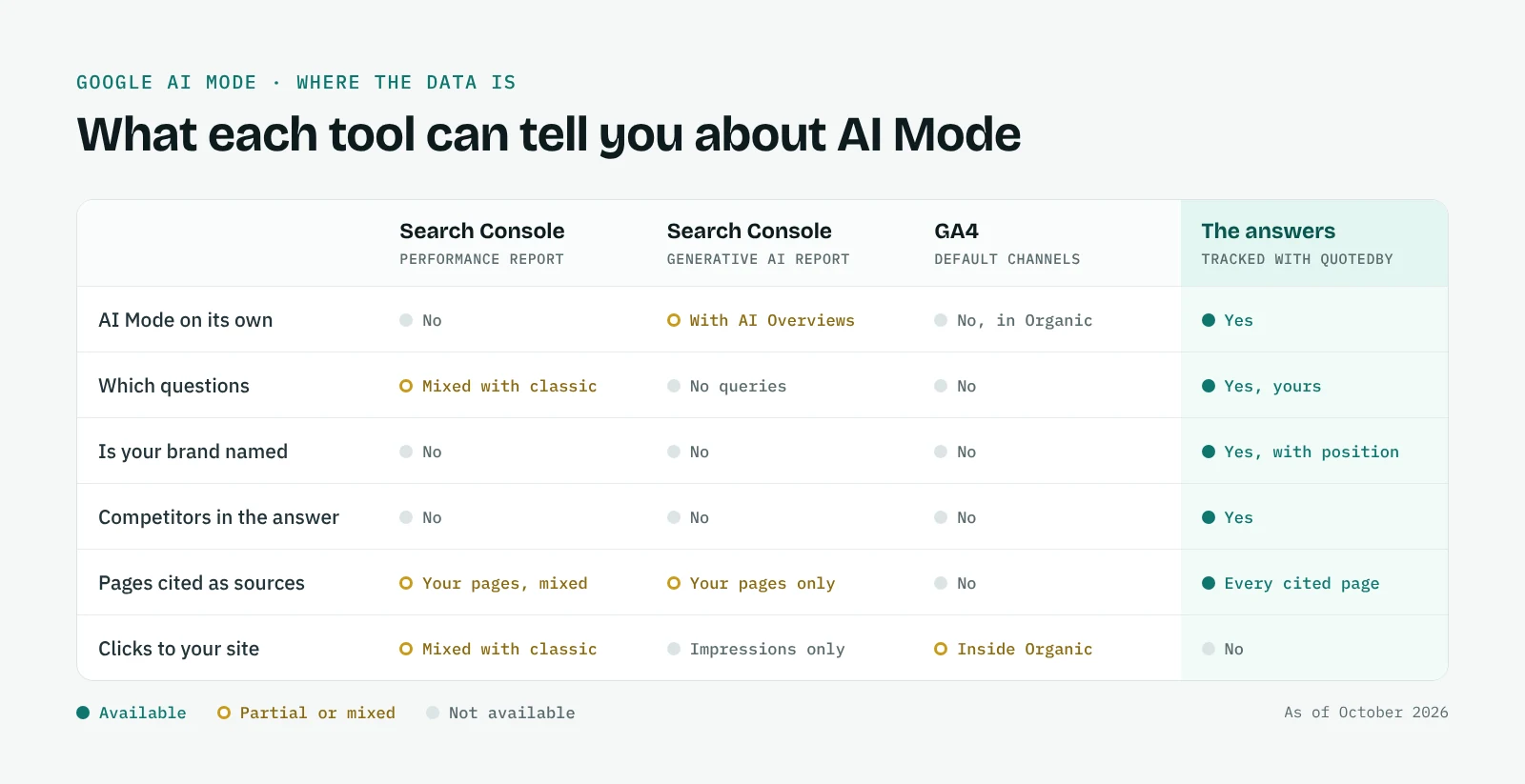
Google offers two reports, both partial. The Performance report in Search Console includes AI Overviews and AI Mode in the Web totals, mixed with classic results. The Generative AI report shows impressions for AI Overviews and AI Mode together, by page, country, device and date, without queries: our guide explains how to read the Generative AI report. In GA4, clicks from both land in Organic Search, with no way to separate them.
Google also notes that no third-party tool can access its internal ranking or AI systems. What a tool can do is read the answers people see. QuotedBy does that for Google AI Mode: it opens AI Mode with your questions, saves each answer with the brands it names and the pages it cites, and repeats on a schedule. It does not track AI Overviews. Since both features rely on the same core systems, AI Mode answers are a useful signal of where you stand, though the two do not always cite the same pages. Our Google AI Mode tracker page compares what each tool can tell you, and how to track AI traffic in GA4 explains what the analytics side shows.
When you change a page, compare the answers before and after over several runs. The before and after view shows how to read the difference, and AI citation tracking shows which of your pages are cited and which competitors' pages are cited instead.
Frequently asked questions
How do I get my website into Google AI Overviews?
Make sure the page is indexed and eligible for a snippet, then make it one of the most useful results for the searches behind the question. There is no submission process and no special markup.
Can I opt out of AI Overviews?
Partly. nosnippet, data-nosnippet and max-snippet limit what Google can quote, including in AI features, but they also affect classic snippets. noindex removes the page from Search entirely.
Does schema markup help with AI Overviews?
Not directly. Google says there is no special schema for AI features. Structured data still helps with rich results and must match the visible content.
Do I need an llms.txt file for Google?
No. Google says its Search does not use llms.txt or similar files.
Why does my page rank but not appear in AI Overviews?
AI Overviews draw on several related searches, not just the one you rank for, and use only a few pages. Check whether competitors answer the follow-up questions your page leaves out, and whether a snippet control limits what Google can quote.
Can I track my brand in AI Overviews?
Search Console's Generative AI report shows impressions without queries. To see which brands Google's AI names for your questions, QuotedBy tracks Google AI Mode, which uses the same core systems; it does not track AI Overviews.